
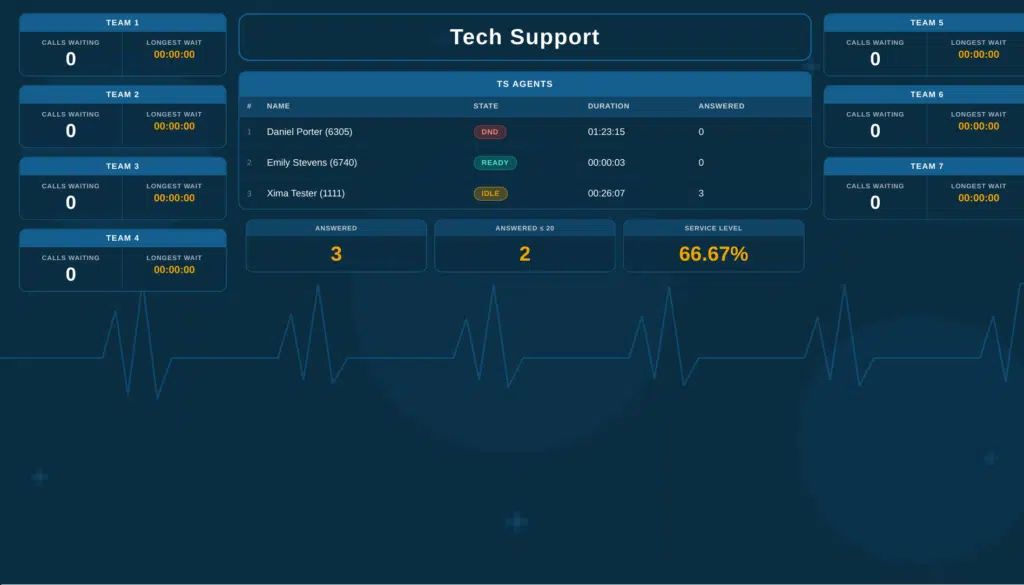
Somewhere in your contact center right now, a supervisor is toggling between five different screens trying to figure out why hold times just spiked. They’re pulling data from one system, checking agent status in another, and wondering if there’s a faster way to see what’s actually happening on the floor.
There is. Cloud contact center wallboard tools give you real-time visibility into your operation—queue depths, agent availability, service levels, and call abandonment rates—all in one place. For healthcare and regulated support teams, that visibility isn’t optional. It’s how you catch problems before they become compliance issues.
Xima CCaaS gives you real-time wallboards built specifically for regulated industries, with HIPAA-ready reporting and AI-powered analytics that score 100% of your interactions. This guide breaks down seven cloud contact center platforms so you can find the one that fits your operation.
Quick guide: 7 cloud contact center wallboard tools for healthcare teams
- Xima CCaaS: The top choice for healthcare and regulated contact centers needing real-time wallboards with HIPAA-compliant analytics
- Genesys Cloud CX: Enterprise-scale platform with omnichannel routing capabilities
- Five9: Cloud-native option with workforce optimization features
- Talkdesk: AI-focused platform with customizable reporting dashboards
- NICE CXone: Large-scale deployment option with analytics tools
- RingCentral Contact Center: Unified communications platform with contact center features
- CloudTalk: Call center software with wallboard functionality for smaller teams
How we chose the top cloud contact center wallboard tools
Picking the right wallboard tool means understanding what actually matters when you’re running a healthcare contact center. You need more than flashy dashboards—you need visibility that helps you make decisions in the moment while staying audit-ready.
Xima’s real-time wallboards are covered on the feature page.
Here’s what we looked for:
- Real-time visibility: Can you see queue depths, agent status, and service levels the second they change? Delayed data means delayed decisions
- Healthcare compliance readiness: Does the platform support HIPAA requirements out of the box, or are you bolting on third-party tools?
- Cradle-to-grave reporting: Can you trace every patient interaction from the moment they hit your IVR to post-call wrap-up?
- AI-powered quality assurance: Does the system score calls automatically, or are your supervisors still sampling 1-3% manually?
- EHR and CRM integration: Does the platform connect natively with your existing systems, or do you need middleware?
- Ease of use: Can your supervisors customize dashboards themselves, or do they need IT to make changes?
- Support and onboarding: What does the implementation process look like, and who’s there when something breaks?
The 7 top cloud contact center wallboard tools for healthcare teams
1. Xima CCaaS: Top overall cloud contact center wallboard tool for healthcare
Xima CCaaS stands out because it was built with regulated industries in mind from the start. You get real-time wallboards that show exactly what’s happening across your queues—average handle time, calls waiting, agent availability, and abandonment rates—updated the moment conditions change.
What makes Xima different is the depth of visibility you get without the complexity. Your supervisors can create custom wallboards and scheduled reports without waiting on IT. The platform integrates with over 70 EHR systems natively, so patient data flows where it needs to go.
Xima’s AI-powered auto QA scores 100% of your interactions automatically. That means you’re not building your compliance program on a 1-3% sample anymore. You’re seeing everything. When an auditor asks for records, you have a complete audit trail ready.
The white-glove onboarding means you’re not figuring this out alone. Xima’s team works with you to configure dashboards, set up integrations, and train your supervisors—so you’re getting value from day one.
Xima CCaaS features
- Real-time wallboards: Customizable displays showing queue metrics, agent status, and service levels that update instantly—so you can catch issues before patients experience long hold times
- AI-powered auto QA: Automatic scoring of every call using speech analytics and sentiment analysis, eliminating the blind spot that comes with manual sampling
- Cradle-to-grave reporting: Track every patient interaction from first contact through resolution, giving you the complete picture auditors need
- HIPAA-compliant analytics: Built-in security controls and audit trails that meet healthcare regulatory requirements without extra configuration
- Native EHR integrations: Direct connections to over 70 electronic health record systems, so patient information flows automatically between platforms
- Queue callback: Let patients request a callback instead of waiting on hold, reducing abandonment rates and improving satisfaction scores
Xima CCaaS pros and cons
Pros:
- Real-time wallboards update instantly, giving supervisors immediate visibility into queue conditions
- AI-powered QA scores 100% of interactions, closing the compliance blind spot
- Native integrations with 70+ EHRs eliminate middleware complexity
Cons:
- The full feature set works most effectively for teams that commit to the cloud deployment model
- Advanced AI analytics require initial configuration with your specific compliance requirements
- Organizations with highly customized legacy systems may need additional integration planning
2. Genesys Cloud CX: Enterprise-scale platform with omnichannel support
Genesys Cloud CX offers a contact center platform designed for large enterprise deployments. The system includes workforce management tools and supports voice, chat, email, and social channels through a single interface.
The platform includes reporting dashboards and analytics capabilities. Implementation typically requires dedicated resources given the scope of configuration options available.
Genesys Cloud CX features
- Omnichannel routing: Route interactions from voice, chat, email, and social channels through one platform
- Workforce management: Scheduling and forecasting tools for managing agent capacity
- Analytics dashboards: Reporting interfaces showing contact center performance metrics
Genesys Cloud CX pros and cons
Pros:
- Supports multiple communication channels through a single interface
- Includes workforce management and scheduling capabilities
- Offers APIs for connecting with third-party systems
Cons:
- Implementation complexity often requires dedicated IT resources and extended timelines
- Feature depth can exceed what smaller healthcare teams need or will use
- Native EHR integrations may require additional configuration or middleware
3. Five9: Cloud-native platform with workforce optimization
Five9 offers a cloud contact center platform with workforce optimization features. The system includes real-time and historical reporting dashboards, along with tools for managing agent schedules and performance.
The platform supports voice and digital channels. Healthcare organizations should verify specific HIPAA compliance configurations during evaluation.
Five9 features
- Workforce optimization: Tools for scheduling, quality management, and performance tracking
- Reporting dashboards: Real-time and historical views of contact center metrics
- Digital engagement: Support for chat, email, and SMS alongside voice
Five9 pros and cons
Pros:
- Cloud-native architecture designed for scalability
- Includes workforce optimization tools within the platform
- Offers reporting across multiple interaction channels
Cons:
- Healthcare-specific compliance features may require additional configuration
- EHR integrations often need third-party connectors
- Dashboard customization options vary by subscription tier
4. Talkdesk: AI-focused platform with customizable dashboards
Talkdesk positions itself as an AI-driven contact center platform with customizable reporting capabilities. The system includes agent-facing interfaces and supervisor dashboards for monitoring performance.
The platform offers integration options through its AppConnect marketplace. Healthcare organizations will want to evaluate the specific compliance certifications included with their deployment.
Talkdesk features
- Customizable dashboards: Reporting interfaces that can be configured to show specific metrics
- AI capabilities: Automated tools for transcription and interaction analysis
- AppConnect integrations: Marketplace of pre-built connections to third-party applications
Talkdesk pros and cons
Pros:
- Dashboard customization allows supervisors to configure their own views
- Integration marketplace offers connections to multiple third-party tools
- Includes AI-powered transcription features
Cons:
- Healthcare-specific compliance capabilities depend on deployment configuration
- Full AI feature access varies by subscription level
- Native EHR integrations are limited compared to healthcare-focused platforms
5. NICE CXone: Large-scale deployment option with analytics
NICE CXone offers an enterprise contact center platform with analytics and workforce management tools. The system includes reporting dashboards and supports large-scale deployments across multiple locations.
The platform includes interaction analytics capabilities. Organizations should plan for a structured implementation process given the platform’s scope.
NICE CXone features
- Interaction analytics: Tools for analyzing recorded interactions and identifying trends
- Workforce management: Scheduling, forecasting, and adherence tracking
- Multi-site support: Capabilities for managing contact centers across locations
NICE CXone pros and cons
Pros:
- Designed for large-scale, multi-location deployments
- Includes interaction analytics for identifying patterns in calls
- Offers workforce management and scheduling tools
Cons:
- Platform complexity typically requires extended implementation timelines
- Feature set may exceed what smaller healthcare contact centers need
- Full analytics capabilities are not available on all subscription tiers
6. RingCentral Contact Center: Unified communications with contact center features
RingCentral Contact Center combines unified communications with contact center capabilities. The platform includes voice, video, and messaging features alongside call routing and reporting tools.
Organizations already using RingCentral for internal communications may find the integration straightforward. Healthcare-specific compliance features should be verified during evaluation.
RingCentral Contact Center features
- Unified communications: Voice, video, and messaging through one platform
- Skills-based routing: Route calls to agents based on defined skill sets
- Reporting tools: Dashboards showing call metrics and agent performance
RingCentral Contact Center pros and cons
Pros:
- Combines internal communications with contact center in one platform
- Includes skills-based routing capabilities
- Offers mobile apps for remote agent support
Cons:
- Contact center features are separate from the core RingCentral product
- Healthcare-specific compliance certifications vary by deployment type
- Real-time wallboard customization options are more limited than dedicated CCaaS platforms
7. CloudTalk: Call center software with wallboard functionality
CloudTalk offers call center software with wallboard features designed for smaller teams. The platform includes real-time dashboards and integrations with popular CRM systems.
The system is positioned for sales and support teams. Healthcare organizations will need to evaluate whether the platform’s compliance capabilities meet their specific regulatory requirements.
CloudTalk features
- Real-time wallboards: Dashboards displaying call metrics and queue status
- CRM integrations: Connections to systems like Salesforce and HubSpot
- Call recording: Recording capabilities for quality monitoring
CloudTalk pros and cons
Pros:
- Wallboard functionality included in the platform
- CRM integrations connect with popular systems
- Interface designed for ease of use
Cons:
- Healthcare-specific compliance features are limited compared to purpose-built platforms
- EHR integrations are not a primary focus
- AI-powered QA capabilities are not as developed as healthcare-focused alternatives
Comparison table: Cloud contact center wallboard tools for healthcare
| Platform | Native EHR Integrations | AI-Powered Auto QA | Cradle-to-Grave Reporting |
|---|---|---|---|
| Xima CCaaS | 70+ | ✓ | ✓ |
| Genesys Cloud CX | Via API | ✓ | ✓ |
| Five9 | Via connectors | ✓ | ✓ |
| Talkdesk | Limited | ✓ | ✗ |
| NICE CXone | Via API | ✓ | ✓ |
| RingCentral | Limited | ✗ | ✗ |
| CloudTalk | ✗ | ✗ | ✗ |
What metrics should healthcare contact center wallboards display?
The metrics on your wallboard should drive action, not just fill a screen. For healthcare contact centers, that means focusing on indicators that directly impact patient experience and regulatory compliance.
Start with service level—the percentage of calls answered within your target time. If you’re aiming for 80% of calls answered in 20 seconds, that number should be visible at all times. When it drops, supervisors can react immediately.
Average handle time matters, but context matters more. A spike in handle time during flu season might be expected. The same spike on a normal Tuesday needs investigation. Your wallboard should show trends, not just current numbers.
Abandonment rate tells you how many patients gave up before reaching an agent. In healthcare, an abandoned call could mean a missed appointment, a billing question that turns into a complaint, or a clinical concern that goes unaddressed.
Queue depth and longest wait time give supervisors the information they need to make staffing decisions in real time. If ten patients are waiting and the longest has been on hold for eight minutes, that’s a problem you can solve right now—if you can see it.
Xima’s contact center software for healthcare covers patient-facing queue requirements.
How do real-time wallboards improve healthcare contact center compliance?
Compliance in healthcare contact centers isn’t about passing an annual audit. It’s about having the visibility to catch problems before they become violations—and the documentation to prove you did.
Real-time wallboards give supervisors immediate awareness of service levels and queue conditions. When hold times exceed acceptable thresholds, they can see it happening and intervene. That’s the difference between a minor delay and a pattern that shows up in complaint data.
The real compliance value comes from pairing wallboards with cradle-to-grave reporting. When you can trace every patient interaction from initial contact through resolution, you have the audit trail regulators expect. You’re not reconstructing records after the fact—you’re documenting as you go.
AI-powered quality assurance changes what’s possible. Instead of sampling 1-3% of calls and hoping you catch issues, you’re scoring 100% of interactions automatically. Xima’s auto QA identifies compliance risks in real time, so supervisors can address problems before they become patterns.
Why Xima CCaaS is the top cloud contact center wallboard tool for healthcare
Healthcare contact centers face a specific set of challenges that generic platforms weren’t built to solve. You need real-time visibility, but you also need that visibility to come with compliance built in—not bolted on as an afterthought.
Xima CCaaS delivers real-time wallboards that show exactly what’s happening across your queues, updated the moment conditions change. Your supervisors can create and customize dashboards themselves, without waiting on IT or submitting tickets. That means faster decisions when patient hold times start climbing.
The difference is what happens beneath those dashboards. Xima’s cradle-to-grave reporting captures every interaction from the moment a patient enters your IVR through post-call wrap-up. When an auditor asks for the complete record of a specific patient’s interactions over the past 90 days, you have it ready.
Xima’s AI-powered auto QA scores 100% of your calls automatically using speech analytics and sentiment analysis. You’re not building your compliance program on a 1-3% sample anymore. You’re seeing everything—and catching issues before they become patterns.
With native integrations to over 70 EHR systems and white-glove onboarding support, Xima CCaaS gives you enterprise-grade wallboard capabilities without the enterprise complexity. See what real-time visibility looks like for your contact center.
FAQs about cloud contact center wallboard tools
What is a contact center wallboard?
A contact center wallboard is a real-time display showing key performance metrics like queue depth, agent availability, and service levels. Xima CCaaS wallboards update instantly so supervisors can make decisions the moment conditions change—without toggling between multiple systems.
Why do healthcare contact centers need real-time wallboards?
Healthcare contact centers handle time-sensitive patient communications where delays can affect outcomes. Xima’s real-time wallboards give supervisors immediate visibility into hold times and abandonment rates, so they can intervene before patients give up or compliance thresholds are breached.
What’s the difference between wallboards and standard reporting?
Standard reports show what happened yesterday or last week. Wallboards show what’s happening right now. Xima CCaaS combines both—real-time wallboards for immediate awareness and cradle-to-grave reporting for the historical documentation auditors need.
Can wallboards help with HIPAA compliance?
Yes. Real-time wallboards help you monitor service levels and response times, while integrated reporting creates the audit trail HIPAA requires. Xima CCaaS pairs wallboard visibility with AI-powered QA that scores 100% of interactions, closing the compliance blind spot that comes with manual sampling.
How customizable are cloud contact center wallboards?
Customization varies by platform. Xima CCaaS lets supervisors create and modify their own wallboard layouts without IT involvement—so you can display the specific metrics that matter to your operation without waiting on a support ticket.
What integrations should healthcare contact centers look for?
EHR integration is critical. Xima CCaaS connects natively with over 70 electronic health record systems, so patient information flows automatically between platforms. You should also look for CRM integration and the ability to connect with your existing phone system without replacing it.


