
Somewhere in your contact center today, a customer is waiting. They’ve sent a chat message, left a voicemail, and followed up with an email—and your agents are scrambling to piece together the full picture. That’s the structural reality of how most SMB and mid-market contact centers still operate in 2026.
Building an AI omnichannel contact center isn’t about chasing the latest technology trend. It’s about solving a real operational problem: customers expect you to remember who they are, what they’ve asked, and what happened last time—regardless of which channel they use. Xima Software helps contact center leaders close this gap with unified voice, chat, email, and SMS capabilities that connect every interaction from start to finish.
This guide walks you through exactly what it takes to build a next-generation contact center. You’ll learn how AI-powered automation, skills-based routing, and real-time analytics work together to reduce handle times and improve first-contact resolution. No abstract theory. Just the practical framework you need to modernize your operation.
Key Takeaways: How to Build an AI Omnichannel Contact Center in 2026
- An AI omnichannel contact center unifies voice, chat, email, and SMS interactions so your agents see the complete customer journey in one place.
- Customer service automation powered by AI handles routine inquiries, freeing your agents to focus on complex, high-value conversations.
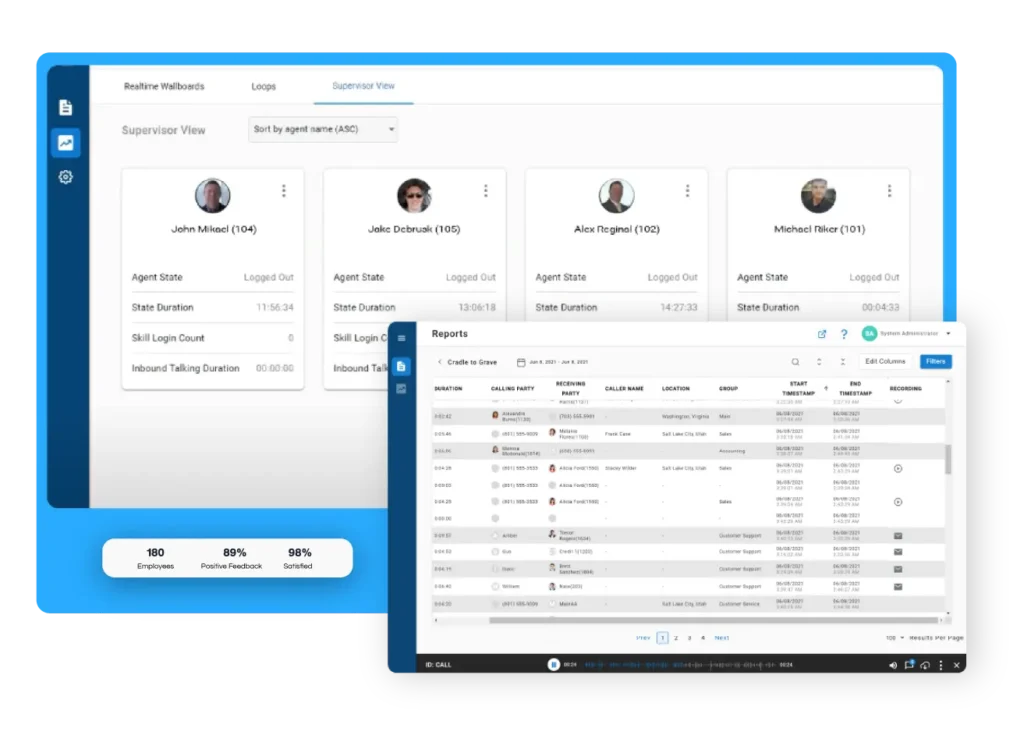
- Xima Software’s cradle-to-grave reporting captures every interaction from queue entry to wrap-up, giving supervisors real-time visibility.
- Skills-based routing and queue callback reduce wait times and connect customers with the right agent on the first try.
- SMBs can now access enterprise-grade contact center technology without enterprise-level cost or complexity—starting small and scaling up.
What Is an AI Omnichannel Contact Center?
An AI omnichannel contact center is a unified platform that connects all customer communication channels—voice, chat, email, SMS, and social media—into a single system. When a customer switches from chat to phone, your agents see the entire conversation history without asking the customer to repeat themselves.
Xima’s AI contact center capabilities support the build described in this guide.
That’s not a multichannel contact center. It’s fundamentally different. Multichannel means you offer multiple ways to reach your business. Omnichannel means those channels are connected, and AI ties them together intelligently.
AI enters the picture in several critical ways: routing customers to the right agent based on skills and availability, automating responses to common questions, analyzing sentiment in real-time, and scoring 100% of interactions for quality assurance. The result is faster resolution times, lower abandonment rates, and happier customers.
Why SMBs and Mid-Market Contact Centers Need Omnichannel Now
Here’s what’s happening in most SMB contact centers right now: agents toggle between four or five different systems to handle a single customer inquiry. They check the phone queue, flip to the chat window, dig through email tickets, and pull up the CRM. Meanwhile, the customer waits.
A McKinsey study on contact center operations found that organizations effectively blending human agents with AI capabilities achieve significantly higher customer satisfaction scores while reducing operational costs.
The operational reality is this: your competitors are already connecting these dots. If your agents can’t see the full customer journey, you’re asking customers to do the work of remembering—and they won’t. They’ll leave.
The Core Components of Next-Generation Contact Center Technology
Building an AI omnichannel contact center requires five foundational components working together. Miss one, and you’ll create new blind spots instead of eliminating existing ones. Here’s what each component does and why it matters.
Unified Communication Channels
Every interaction—phone call, web chat, email, SMS, social message—should feed into one system. Your agents need a single interface that shows the customer’s complete history, not scattered records across disconnected tools.
This isn’t just about convenience. It’s about accuracy. When an agent picks up a phone call from someone who emailed yesterday and chatted last week, they should know instantly. Xima CCaaS delivers this unified omnichannel experience by combining voice, chat, email, and SMS into one platform, with no channel silos.
Xima handles these channels through multi-channel communications.
AI-Powered Routing and Queue Management
Skills-based routing matches incoming contacts with agents who have the right expertise to handle them. An account billing question goes to someone trained in billing. A technical support issue goes to your tech specialists. The AI makes this decision in milliseconds.
Queue callback takes it further. Instead of forcing customers to wait on hold, the system offers to call them back when an agent becomes available. They hang up, go about their day, and receive a callback at the right time. Wait times drop. Abandonment rates fall. Customer satisfaction rises.
Intelligent Virtual Assistants and Chatbots
AI chatbots handle the routine questions that used to consume agent time: “What are your hours?” “Where’s my order?” “How do I reset my password?” When the chatbot encounters a question it can’t answer, it escalates smoothly to a human agent—passing along the full conversation history.
The goal isn’t to replace agents. The goal is to free them. When AI handles 30-40% of routine inquiries, your human agents focus on complex problems that require empathy, judgment, and creative problem-solving. That’s where they add real value.
Real-Time Analytics and Reporting
You can’t improve what you can’t see. Real-time dashboards show supervisors exactly what’s happening right now: how many customers are waiting, which agents are available, what the average handle time looks like this hour versus last hour.
Historical reporting tells a different story—patterns over time. Which days are busiest? Which channels generate the most escalations? Where are agents spending too much time? Xima Software’s real-time wallboards and customizable reports give supervisors this visibility without requiring IT support to build custom queries.
AI-Powered Quality Assurance
Here’s the math that most contact centers are built on: supervisors manually review 1-5% of interactions. The other 95-99% goes unreviewed. That’s not a quality assurance program. That’s assumption.
AI-powered Auto QA changes the equation entirely. It scores 100% of interactions—every call, every chat, every email—for compliance, sentiment, and quality. Supervisors stop spending hours listening to random call samples and start spending time on targeted coaching. Xima Software’s speech analytics and sentiment analysis deliver this capability without requiring a massive technology investment.
How Customer Service Automation Reduces Handle Time
The average handle time in a contact center includes more than just the conversation. It includes the time agents spend searching for information, transferring between systems, and documenting what happened. Automation attacks each of these time sinks directly.
Automated Information Retrieval
When a customer calls, AI pulls their account information before the agent even says hello. CRM records, recent orders, support history, open tickets—all visible in one screen. The agent doesn’t waste thirty seconds pulling up data. They start solving the problem immediately.
Native CRM integrations make this possible without middleware or custom development. Xima CCaaS connects bi-directionally with popular CRMs, so data flows automatically in both directions. Agents work in one interface instead of copying information between systems.
Automated Post-Call Documentation
Speech-to-text transcription captures the entire conversation automatically. AI summarizes the key points, tags the interaction with relevant categories, and populates the disposition fields. What used to take agents three to five minutes of wrap-up time now happens in seconds.
That’s not a soft efficiency gain. That’s real time back in the day. If an agent handles 60 calls and saves two minutes per call on wrap-up, that’s two hours—two hours available for additional customer contacts or focused coaching.
Intelligent Call Deflection
Not every phone call needs a live agent. Intelligent IVR systems let customers complete routine transactions—checking account balances, making payments, updating contact information—without ever reaching the queue. They get what they need faster. Your agents handle fewer repetitive calls.
The key is making self-service genuinely useful, not a maze of menu options that frustrates callers into pressing zero. Modern IVR uses natural language processing to understand what callers actually say, then routes them to the right outcome—whether that’s an automated resolution or a skilled agent.
A Step-by-Step Framework for Building Your AI Omnichannel Contact Center
You don’t need to overhaul your entire contact center overnight. But you do need a clear plan. Here’s the practical framework for moving from where you are today to a fully integrated AI omnichannel operation.
Step 1: Audit Your Current State
Before you build anything new, document what exists now. Answer these questions honestly:
- How many systems do agents access to handle a single customer inquiry?
- What percentage of your interactions are reviewed for quality?
- What’s your current first-contact resolution rate?
- How long does it take to reconstruct the full history of a single customer journey?
Write those answers down. They’ll become your baseline for measuring progress. If you can’t answer them with real numbers, that’s your first blind spot to address.
Step 2: Map Your Customer Channels
List every channel customers use to reach you: phone, email, web chat, SMS, social media, self-service portal. For each channel, document the current volume, average handle time, and escalation rate.
This map reveals where your biggest opportunities live. Maybe 40% of your volume comes through phone, but email has triple the average handle time because agents lack the right tools. Maybe web chat is growing fast but disconnected from your CRM.
Step 3: Define Your Integration Requirements
What systems must your new contact center platform connect with? CRM, helpdesk, EHR/EMR, billing, order management—document each integration and the data that needs to flow between systems.
Look for platforms that offer native integrations rather than requiring third-party middleware. Xima CCaaS connects with popular CRMs, Microsoft Teams, and over 70 EHR systems, so you’re not building custom integration projects from scratch.
Step 4: Choose Your Deployment Model
Cloud, on-premises, or hybrid? Each model has tradeoffs around control, compliance, cost, and scalability.
Cloud: Fastest deployment, lowest upfront cost, automatic updates, scales on demand. Ideal for most SMBs and mid-market organizations.
On-premises: Maximum control over data, consistent performance, predictable costs. Required for some regulated industries or organizations with strict data residency requirements.
Hybrid: Core functions on-premises with cloud-based AI and analytics. Balances control with access to advanced capabilities.
Xima Software offers both cloud and on-premises deployment options, so you’re not locked into one model that doesn’t fit your compliance requirements or operational preferences.
Step 5: Pilot with a Single Channel or Team
Don’t roll out everything at once. Start with one channel—web chat, for example—or one team. Prove the value, identify the rough edges, and refine your processes before expanding.
A focused pilot gives you real performance data to show stakeholders. “Our chat team reduced average handle time by 22%” is more compelling than projections. It also builds internal champions who advocate for broader adoption.
Step 6: Train Your Team
Technology only works if your people know how to use it. Plan for hands-on training before go-live and ongoing coaching as you add capabilities.
Look for platforms with intuitive interfaces that minimize training time. Xima Software’s user-friendly design means agents can start productively on day one, but you’ll still want to invest in training supervisors on analytics, reporting, and the coaching workflows that make AI-powered QA valuable.
Step 7: Measure, Iterate, Expand
After launch, track your key metrics weekly: average handle time, first-contact resolution, customer satisfaction, abandonment rate, quality scores. Compare against your baseline from Step 1.
When you see improvement in your pilot, expand to additional channels or teams. When something isn’t working, dig into the data to understand why. Measurement turns a technology rollout into an operational improvement program.
What to Look for in a Contact Center Platform
When evaluating platforms for your AI omnichannel contact center, focus on capabilities that solve real operational problems—not feature lists that sound impressive but don’t deliver practical value.
Unified Customer View
Ask to see the complete lifecycle of a single interaction in one view, from queue entry to wrap-up. Not a summary. Not data spread across multiple screens. One unified view that shows everything an agent needs.
If a vendor pivots away from this request or redirects you to a different part of the demo, that’s your answer. A platform that can’t show you cradle-to-grave visibility is a platform that creates blind spots.
Real-Time and Historical Reporting
You need both. Real-time dashboards show what’s happening now. Historical reports reveal patterns and trends. The best platforms let you build custom reports and wallboards without IT support.
Ask about report delivery options. Can you schedule reports to arrive in your inbox? Can supervisors see real-time metrics on a wall-mounted display? These details matter for day-to-day operations.
AI Governance and Transparency
AI-powered features should include human oversight and clear privacy policies. Ask how the platform handles data, where AI decisions are logged, and how you can audit automated actions.
Avoid platforms that treat AI as a black box. You need to understand what the AI is doing, why it makes certain decisions, and how to adjust its behavior when it doesn’t match your operational needs.
Flexible Licensing and Pricing
Concurrent licensing lets you pay for the number of simultaneous users rather than total named users. This matters if you have part-time agents, multiple shifts, or seasonal volume fluctuations.
Ask for transparent, all-in pricing with clear implementation and usage costs. Xima Software’s transparent pricing philosophy means no surprise fees—what you see is what you pay.
Scalability Without Complexity
Your contact center will grow. The platform should grow with you without requiring a major rearchitecting project. Can you add channels easily? Can you spin up additional capacity during peak periods?
SMBs especially need platforms that deliver enterprise-grade features without enterprise complexity. You shouldn’t need a dedicated IT team to manage your contact center software.
How AI Quality Assurance Changes Contact Center Operations
Manual QA has two problems that don’t get discussed honestly enough. The first is coverage—you’re reviewing 1-5% of interactions at best. The second is timing—by the time a supervisor reviews a call from two weeks ago, the agent has handled hundreds more interactions the same way.
Moving from Sample-Based to Full-Coverage QA
AI-powered QA scores every interaction, not a random sample. Speech analytics transcribes calls and identifies compliance risks, sentiment shifts, and quality issues automatically. The supervisor’s job changes from listening to random calls to coaching based on data.
This is where Xima Software’s Auto QA and speech analytics deliver real value. When 100% of interactions are scored, patterns emerge that sample-based review would never catch. You see which agents need coaching, which processes cause confusion, and which scripts actually work.
Real-Time Intervention vs. Delayed Feedback
Real-time sentiment analysis detects when a call is going badly—rising frustration, negative language, compliance red flags. The system alerts a supervisor while the call is still in progress, not two weeks later.
That’s the difference between reactive and proactive management. Instead of discovering problems in historical reports, supervisors can intervene, assist, or coach in the moment when it matters most.
Reducing Agent Burnout Through Better Data
Agents burn out when they feel overwhelmed, unsupported, and measured unfairly. AI-powered QA addresses all three by distributing workload more evenly (through intelligent routing), offering real-time support (through supervisor alerts), and evaluating performance based on data (not cherry-picked samples).
When agents know every interaction is scored consistently, they trust the feedback. When supervisors have complete visibility, they can coach effectively instead of guessing.
Compliance and Security in AI-Powered Contact Centers
Regulated industries—healthcare, financial services, government—face strict requirements around data handling, call recording, and customer privacy. Your contact center platform must meet these requirements without creating operational challenges.
Meeting HIPAA, PCI DSS, and Other Standards
Healthcare contact centers handling protected health information must comply with HIPAA. Financial services contact centers processing payments must comply with PCI DSS. These aren’t optional checkboxes—they’re operational requirements with serious consequences for violations.
Look for platforms that include compliance features as standard capabilities, not expensive add-ons. Xima Software supports HIPAA, PCI DSS, and other regulatory standards, with audit trails that document every interaction for examination readiness.
Data Ownership and Security
Who owns your contact center data? Where is it stored? Who can access it? These questions matter more as AI capabilities analyze and learn from your customer interactions.
On-premises deployment gives you absolute control over data—customer records stay on your servers. Cloud deployment offers convenience but requires careful vendor selection. Either way, you need clear answers about data ownership, encryption, and access controls.
Audit Trail Documentation
When an examiner requests the complete record of a customer’s interactions over the past 90 days, how long does it take your team to produce it? If the answer is more than a few minutes, you have a documentation problem.
Cradle-to-grave reporting captures every interaction from start to finish in one searchable record. That’s not just operational convenience—it’s examination readiness.
Building the Business Case for Contact Center Modernization
Technology decisions require budget approval. Here’s how to frame the investment in terms your leadership team will understand.
Quantifying Current Costs
Start with what the current state is costing you today—before any examiner shows up, before any major incident occurs. Calculate the real numbers:
- Supervisor hours spent on manual QA review each week
- Agent time lost to system switching and manual documentation
- Customer churn attributed to poor service experiences
- Revenue lost to call abandonment
These aren’t soft costs. They’re real, and they compound every week. Document them in dollars and hours to build a baseline for ROI calculation.
Projecting Improvement Gains
Based on industry data and platform capabilities, project realistic improvements:
- Average handle time reduction of 15-25% through automation and unified interfaces
- Abandonment rate reduction of 20-30% through queue callback and better routing
- First-contact resolution improvement of 10-20% through skills-based routing and real-time agent support
- Supervisor time savings of 50%+ by replacing manual QA with AI-powered scoring
These projections should be grounded in specific platform capabilities and your current baseline. Vague promises don’t survive budget discussions.
Addressing Total Cost of Ownership
Beyond licensing fees, consider implementation costs, training, ongoing maintenance, and integration work. Cloud platforms typically have lower upfront costs but ongoing subscription fees. On-premises options have higher initial investment but may offer lower long-term costs for stable workloads.
Ask vendors for transparent, all-in pricing that includes everything: software, implementation, training, support, and any usage-based fees. Surprise costs derail budget approvals and damage vendor relationships.
Common Mistakes to Avoid When Building Your Contact Center
Most contact center modernization projects fail not because of technology problems but because of planning and execution mistakes. Here’s what to watch for.
Mistake 1: Prioritizing Features Over Integration
A platform with impressive AI features that doesn’t integrate with your CRM creates more problems than it solves. Agents end up with yet another system to manage, and customer data stays fragmented.
Integration should be a non-negotiable requirement, not a nice-to-have. Ask vendors to demonstrate real integrations with your specific systems before signing.
Mistake 2: Underinvesting in Training
New technology requires new skills. Supervisors need to understand AI-powered analytics. Agents need to know how to use new routing and callback features. Leadership needs visibility into what’s possible with real-time data.
Plan for more training than you think you need. Budget time for practice and iteration. The best technology fails when people don’t know how to use it.
Mistake 3: Trying to Solve Everything at Once
A phased approach beats a big-bang rollout almost every time. Start with your highest-impact opportunity—maybe that’s reducing abandonment rates, maybe it’s improving QA coverage, maybe it’s connecting channels. Prove value, then expand.
Trying to fix everything simultaneously overwhelms your team and obscures what’s actually working. Focused pilots generate clear success metrics that build momentum for broader adoption.
Mistake 4: Ignoring the Agent Experience
Contact center technology should make agents’ jobs easier, not harder. Before selecting a platform, involve frontline agents in evaluation. Ask what frustrates them today. Watch how they interact with demo systems.
Agents who feel burdened by their tools burn out faster, deliver worse customer experiences, and leave. A user-friendly interface isn’t a luxury—it’s an operational necessity.
In Conclusion: Your Path to a Modern AI Omnichannel Contact Center
Building an AI omnichannel contact center is not about implementing technology for its own sake. It’s about solving the operational problems that cost you time, money, and customer loyalty every single day.
The customers calling your contact center right now expect you to remember them. They expect to switch channels without starting over. They expect faster resolutions and fewer transfers. Meeting those expectations requires unified channels, intelligent routing, AI-powered automation, and real-time visibility into every interaction.
Xima Software helps SMB and mid-market contact centers achieve this without the complexity and cost of enterprise platforms. Cradle-to-grave reporting, AI-powered Auto QA, skills-based routing, queue callback, and omnichannel support—all in a user-friendly package with transparent pricing and white-glove support.
The question isn’t whether you need these capabilities. The question is how long you’re willing to operate without them—and what that’s costing you every week you wait. See what an AI-powered omnichannel contact center looks like for your operation.
FAQs About How to Build an AI Omnichannel Contact Center in 2026
What is the difference between multichannel and omnichannel contact centers?
Multichannel means you offer multiple communication channels—phone, email, chat. Omnichannel means those channels are connected, so agents see the complete customer history regardless of how the customer reached you.
The practical difference is whether customers have to repeat themselves. Xima Software’s omnichannel platform connects every channel into one unified view, so your agents know the full story from the first moment of the conversation.
How does AI improve contact center quality assurance?
AI-powered QA scores 100% of interactions instead of the 1-5% that manual review covers. It uses speech analytics to detect compliance risks, sentiment shifts, and quality issues automatically.
Xima Software’s Auto QA analyzes every call, chat, and email, surfacing coaching opportunities and compliance flags that sample-based review would miss. Supervisors spend less time listening to random calls and more time on targeted improvement.
What compliance standards should an AI contact center support?
At minimum, healthcare contact centers need HIPAA compliance, and any center processing payments needs PCI DSS compliance. Your platform should include encryption, access controls, audit trails, and documentation capabilities that satisfy examiner requirements.
Xima Software supports HIPAA, PCI DSS, and other regulatory standards as built-in features, with cradle-to-grave reporting that documents every interaction for audit readiness.
Can SMBs afford enterprise-grade contact center technology?
Yes. Cloud-based contact center platforms have eliminated the massive upfront investments that used to exclude smaller organizations. Concurrent licensing and subscription pricing make enterprise capabilities accessible at SMB budgets.
Xima Software specifically targets SMB and mid-market contact centers, delivering real-time reporting, AI-powered analytics, and omnichannel support without the complexity or cost of traditional enterprise platforms.
How long does it take to implement an AI omnichannel contact center?
Implementation timelines vary based on complexity. A focused pilot with a single channel or team can launch in weeks. A full omnichannel deployment across multiple teams typically takes two to four months.
Xima Software’s white-glove onboarding and user-friendly interface minimize implementation time. Many customers see measurable improvement in the first month of deployment.
What metrics should I track after launching a new contact center platform?
Focus on metrics that connect to customer experience and operational efficiency: average handle time, first-contact resolution rate, abandonment rate, customer satisfaction scores, and quality assurance scores. Track them weekly against your baseline.
Xima Software’s real-time dashboards and scheduled reports make tracking easy. Supervisors can monitor performance live on wallboards and receive detailed historical reports automatically.
How does skills-based routing improve customer experience?
Skills-based routing matches incoming contacts with agents who have the specific expertise to handle them. Billing questions go to billing specialists. Technical issues go to technical support. Customers reach the right person on the first try, reducing transfers and resolution time.
Xima Software’s skills-based routing and queue callback work together to reduce wait times and improve first-contact resolution—getting customers to the right agent faster.