
Somewhere in your contact center today, an agent is handling a call that could define your customer’s experience—and you have no idea how it’s going. Maybe they’re resolving a billing question in record time. Maybe they’re missing a critical compliance step. The difference between these two outcomes often determines whether a customer stays or leaves.
For SMB support teams, this blind spot is a structural challenge. You don’t have the headcount for round-the-clock supervision. You don’t have the budget for enterprise-grade solutions that cost more than your entire support department. Xima Software builds AI contact center tools specifically for teams facing these constraints.
This guide walks you through everything you need to know about AI contact centers in 2026—from virtual agents and automated QA to real-time analytics and practical implementation steps. You’ll learn what these capabilities actually do, how they apply to SMB operations, and how to evaluate whether your team is ready.
Key Takeaways: AI Contact Centers for SMB Support Teams in 2026
- AI contact centers combine virtual agents, automated QA, and real-time analytics to give SMB teams visibility into every customer interaction.
- Virtual agents handle routine inquiries automatically, freeing your human agents to focus on complex issues that require empathy and judgment.
- Automated QA scores 100% of interactions instead of the typical 1-3%, eliminating the compliance blind spot most contact centers operate with.
- Xima Software delivers enterprise-grade AI capabilities to SMB teams through an intuitive interface that requires no specialized IT support.
- Real-time dashboards and sentiment analysis help supervisors intervene during calls rather than discovering problems weeks later.
What Is an AI Contact Center?
An AI contact center uses artificial intelligence to automate, analyze, and improve customer interactions across voice, chat, email, and SMS channels. Unlike traditional call centers that rely entirely on human agents, AI contact centers blend automation with human expertise.
Teams comparing options can see how Xima structures its AI contact center software.
The AI handles tasks that don’t require human judgment—routing calls to the right agent, transcribing conversations, flagging compliance issues, answering common questions. Your human agents focus on the conversations that actually need their skills.
For SMB teams, this matters because you’re running a contact center with maybe 15-40 agents. You can’t hire a dedicated quality assurance team. You can’t staff supervisors to listen to every call. AI fills those gaps without adding headcount.
How AI Contact Centers Differ from Traditional Call Centers
Traditional call centers operate on a simple model: customers call, agents answer, supervisors sample a handful of calls for quality review. The math doesn’t work. If your supervisor reviews 2% of calls, 98% of customer interactions happen without any oversight.
AI contact centers flip this model. Every interaction gets analyzed. Every call gets scored. Patterns emerge from data instead of assumptions. Supervisors see real-time dashboards instead of reviewing two-week-old recordings.
The operational difference is significant. Problems get caught during calls, not after. Training happens based on actual performance data, not random samples. Compliance gaps close because they’re visible immediately.
Why SMB Support Teams Need AI Contact Center Capabilities
Large enterprises have been using AI in their contact centers for years. They have the budget for custom implementations and dedicated teams to manage them. SMBs have historically been locked out of these capabilities—until recently.
The technology has matured. Implementation costs have dropped. Platforms like Xima CCaaS now deliver enterprise-grade features through interfaces that don’t require IT departments to manage.
The Visibility Problem for Small Teams
Here’s the scenario that plays out in most SMB contact centers: Your best supervisor spends three hours reviewing calls from last week. They find one training opportunity. Meanwhile, 200 calls happened today that nobody heard.
Manual QA creates a structural blind spot. You’re making decisions based on a tiny fraction of what’s actually happening. You don’t know which agents are struggling. You don’t know which scripts aren’t working. You don’t know until a customer complaint surfaces.
AI changes the math entirely. When every call gets transcribed, analyzed, and scored automatically, nothing is invisible. Your supervisor’s three hours shift from listening to recordings to reviewing flagged issues and coaching agents.
The Efficiency Gap SMBs Face
SMB contact centers often run with minimal slack. When call volume spikes, agents handle more calls. When an agent calls in sick, everyone else picks up the load. There’s no buffer for inefficiency.
AI tools address this directly. Virtual agents handle routine inquiries that don’t need human intervention—password resets, appointment confirmations, order status checks. Skills-based routing sends complex issues to your most qualified agents. Queue callbacks eliminate hold times that frustrate customers and waste agent capacity.
Xima Software designed these capabilities specifically for SMB operations—powerful enough to handle real workloads, simple enough that you don’t need a dedicated administrator to run them.
Core AI Contact Center Capabilities for SMBs
AI contact center technology covers a lot of ground. Not every capability matters equally for SMB teams. These are the ones that deliver the most operational value relative to implementation effort.
Virtual Agents and Conversational AI
Virtual agents handle customer inquiries through natural language processing. A customer calls to check their appointment time. The virtual agent understands the request, pulls the information from your system, and delivers the answer—without involving a human agent.
For SMBs, virtual agents shine in three scenarios. First, after-hours coverage: customers get basic support even when your team isn’t working. Second, peak volume handling: routine calls get resolved automatically while agents focus on complex issues. Third, first-contact resolution: simple inquiries close immediately instead of waiting in queue.
The key is knowing what to automate. Virtual agents work for predictable requests with clear answers. They don’t replace human agents for complaints, complex troubleshooting, or emotionally charged conversations. The best implementations route those calls to humans immediately.
Automated Quality Assurance
Manual QA has two problems that don’t get discussed honestly enough. The first is coverage—at 1-3% review rates, you’re operating on assumption, not data. The second is timing—by the time a supervisor reviews a call from two weeks ago, the agent has handled hundreds more interactions using the same approach.
Automated QA scores every interaction against your criteria. Did the agent use the required greeting? Did they verify customer identity? Did they offer the upsell? The AI answers these questions for every call, not a random sample.
This changes what supervisors do with their time. Instead of listening to recordings, they review exception reports. Instead of guessing which agents need coaching, they see performance data. Xima Software’s AI-powered Auto QA gives SMB teams this capability without requiring dedicated QA staff.
Speech Analytics and Sentiment Analysis
Every call generates data beyond what gets captured in your CRM notes. The customer’s tone. The agent’s confidence level. The moments when frustration started building. Speech analytics extracts this information automatically.
Sentiment analysis tells you how calls are actually going—not how agents report them going. When a customer’s sentiment drops mid-call, supervisors can intervene. When patterns emerge (certain products generating frustration, certain times of day creating tension), you can address root causes.
For SMB teams, this visibility is often the difference between discovering problems reactively (through complaints and churn) versus proactively (through data).
Real-Time Dashboards and Wallboards
Traditional reporting tells you what happened yesterday. Real-time dashboards tell you what’s happening now. For a contact center supervisor, this is the difference between archaeology and active management.
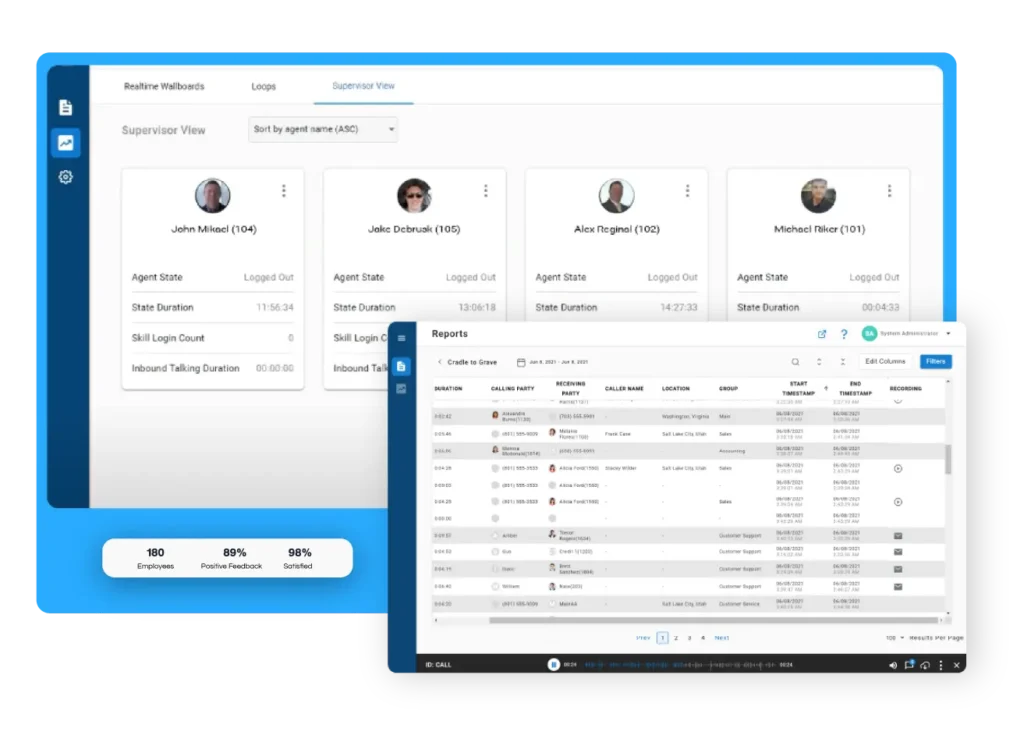
Wallboards display queue status, agent availability, and key metrics across your team. Supervisors see calls waiting, average handle times, and service levels updating in real time. When metrics start trending wrong, intervention happens immediately—not after the day’s results get compiled.
Xima Software’s real-time wallboards give supervisors this visibility without requiring complex setup. The dashboards update automatically, and the interface shows exactly what matters for your operation.
How Virtual Agents Work in Practice
Understanding virtual agents conceptually is different from understanding how they actually operate in an SMB contact center. Here’s what the implementation looks like in practice.
The Technology Behind Virtual Agents
Virtual agents combine several AI technologies. Natural language processing (NLP) interprets what customers say or type. Intent recognition identifies what they’re trying to accomplish. Integration with your business systems retrieves the information needed to respond.
When a customer says “I need to reschedule my appointment,” the virtual agent breaks this down: intent = reschedule, entity = appointment. It then queries your scheduling system, identifies available slots, and presents options—all without human involvement.
Modern virtual agents handle variations in how people phrase requests. “I want to move my appointment,” “Can I change my booking?” and “Something came up—can I come in next week instead?” all map to the same intent.
What Virtual Agents Can and Cannot Handle
Virtual agents excel at predictable, data-driven interactions. Account balance inquiries. Appointment scheduling. Order status updates. Password resets. These requests have clear parameters and definitive answers.
They handle ambiguity, emotional complexity, and novel situations less effectively. A customer calling to complain about a billing error they don’t understand needs human judgment. A caller who’s frustrated about a delayed shipment needs empathy that virtual agents can’t genuinely deliver.
The best implementations identify these boundaries clearly. When a virtual agent detects frustration, confusion, or requests outside its scope, it hands off to a human agent smoothly—with context so the customer doesn’t have to repeat themselves.
Setting Up Virtual Agents for SMB Operations
SMB teams often assume virtual agent implementation requires months of development and dedicated IT resources. That assumption comes from enterprise implementations that were built custom from the ground up.
Modern platforms offer pre-built frameworks. You configure the intents relevant to your business, connect to your data systems, and define the handoff rules. The heavy lifting—NLP training, conversation flow management—is handled by the platform.
Start with your highest-volume, most predictable interactions. If 30% of your calls are appointment confirmations, that’s your starting point. Measure deflection rates (calls resolved without human involvement) and customer satisfaction to refine the approach.
Understanding Automated QA for Contact Centers
Quality assurance in traditional contact centers works on sampling. Supervisors review a percentage of calls, score them against criteria, and use those scores to guide coaching. The system has obvious gaps.
The Math of Manual QA
An average agent handles 40-60 calls per day. A contact center with 20 agents generates roughly 1,000 interactions daily. If your supervisor reviews 30 calls per day—which is aggressive—that’s a 3% sample rate.
That 3% has to be representative, but it rarely is. Supervisors often review calls that got flagged for other reasons (complaints, callbacks) or calls they happened to notice. The sample skews toward problems, missing the patterns in routine interactions.
This creates a blind spot. You’re making training decisions, performance evaluations, and process improvements based on a fraction of actual performance. AI-powered automated QA closes this gap by analyzing 100% of interactions.
How Automated QA Analyzes Interactions
Automated QA starts with transcription. Every call gets converted to text, which AI systems can analyze at scale. The transcription captures not just words but timing—pauses, interruptions, talk-over rates.
Analysis happens against your scorecard. You define the criteria: greeting compliance, verification steps, required disclosures, objection handling. The AI scores each call against these criteria automatically.
Advanced systems go further. Sentiment tracking identifies emotional patterns. Keyword detection flags specific phrases (competitor mentions, pricing objections, escalation requests). Custom scoring weights the criteria that matter most for your operation.
What Changes When You Have 100% QA Coverage
Moving from 3% to 100% coverage isn’t incremental improvement—it’s a fundamentally different operating model. Patterns that were invisible become obvious. Training becomes targeted. Compliance gaps close.
Consider a common scenario: One of your agents has developed a habit of skipping the identity verification step with familiar-sounding callers. In manual QA, this might never surface—it’s not the kind of thing that generates complaints. With automated QA, it shows up immediately as a pattern in their scores.
Xima Software’s automated QA gives SMB teams this visibility through an interface designed for practical use. Supervisors don’t need to interpret complex analytics—they see clear scorecards and flagged exceptions that guide their coaching conversations.
Real-Time Analytics and Supervisor Visibility
Historical reporting tells you what happened. Real-time analytics tell you what’s happening. For contact center operations, this timing difference changes what’s possible.
Why Real-Time Visibility Matters for SMBs
SMB contact centers operate with less margin for error. When three agents call in sick on a busy day, there’s no backup team to activate. When a product issue generates a spike in calls, you need to know immediately—not when tomorrow’s report runs.
Real-time dashboards show queue status, service levels, and agent availability as they change. Supervisors can see that hold times are climbing before customers start hanging up. They can reassign agents before the situation becomes a crisis.
This shifts management from reactive to proactive. Instead of analyzing why yesterday was bad, supervisors actively manage today to prevent problems.
Key Metrics to Track in Real Time
Not every metric needs real-time visibility. Focus on the ones where immediate action changes outcomes.
Service level—the percentage of calls answered with your target time—tells you whether your staffing matches demand right now. Average speed to answer shows how long customers are waiting. Abandon rate reveals how many callers gave up.
Agent-level metrics matter too. Handle time patterns show which agents might need support. Status tracking ensures agents aren’t stuck in after-call work too long. Occupancy rates help balance workload across the team.
How Xima Software Delivers Real-Time Visibility
Xima CCaaS includes real-time wallboards and dashboards that update automatically. Supervisors see the metrics that matter for their operation without configuring complex reports.
The interface prioritizes actionable information. When a metric moves outside normal range, it’s highlighted immediately. Drill-down options let supervisors investigate without losing sight of the big picture. The goal is visibility that drives decisions, not data overload.
Skills-Based Routing and Queue Management
Getting customers to the right agent on the first attempt reduces handle time, improves resolution rates, and creates better experiences. AI makes this routing smarter.
How Skills-Based Routing Works
Traditional routing is simple: calls go to the next available agent. Skills-based routing adds intelligence: calls go to available agents who have the right skills for that type of inquiry.
A customer calling about a complex billing dispute routes to agents certified in billing resolution. A caller asking about a specific product goes to agents trained on that product line. Spanish-speaking callers connect with bilingual agents.
The system matches customer needs to agent capabilities automatically. You define the skill categories, tag agents with their qualifications, and configure routing rules. The AI handles the matching in real time.
Queue Callback and Customer Experience
Hold times frustrate customers and waste their time. Queue callback offers an alternative: instead of waiting on hold, customers request a callback when an agent becomes available.
For SMB teams, this capability delivers several benefits. Customer satisfaction improves because callers aren’t stuck listening to hold music. Abandon rates drop because customers don’t hang up in frustration. Agent conversations start better because customers aren’t already annoyed from waiting.
Xima Software’s queue callback integrates with skills-based routing. Customers waiting for callback get connected to appropriately skilled agents, not just the next available person.
Implementing AI in Your SMB Contact Center
Knowing what AI contact center tools can do is different from knowing how to implement them. Here’s a practical framework for SMB teams.
Step 1: Assess Your Current State
Before implementing AI tools, understand your baseline. Answer these questions honestly:
What percentage of your interactions are currently reviewed for quality? If the answer is under 5%, you have a visibility gap that automated QA can address directly.
What’s your first-call resolution rate? If you don’t know, that’s a data gap. If you do know and it’s below 70%, routing and agent support improvements can help.
What are your highest-volume call types? Identify the interactions that represent 20-30% of your volume. These are candidates for virtual agent handling or streamlined processes.
Step 2: Prioritize Based on Operational Impact
Not every AI capability delivers the same value for every team. Prioritize based on your specific gaps.
If your blind spot is quality visibility, start with automated QA. If your challenge is handle time and queue management, focus on virtual agents and skills-based routing. If supervisors are constantly firefighting without real-time data, implement dashboards first.
Pick one or two capabilities to implement well rather than trying to deploy everything simultaneously. SMB teams have limited bandwidth for change management—focus delivers better results than breadth.
Step 3: Choose a Platform Built for SMB Operations
Enterprise contact center platforms assume you have dedicated IT staff, implementation consultants, and months for deployment. SMB teams rarely have these resources.
Look for platforms that prioritize usability. Can you configure the system without writing code? Is training measured in hours rather than weeks? Does the vendor offer implementation support that doesn’t require a separate services contract?
Xima Software built Xima CCaaS specifically for mid-market and SMB contact centers. The interface is designed for contact center managers, not IT specialists. Implementation happens in weeks, not months. Support is included, not gated behind premium tiers.
Step 4: Define Success Metrics Before Launch
Before activating AI capabilities, document what success looks like. This creates accountability and enables meaningful evaluation.
For automated QA: target QA coverage percentage, time spent on manual review before and after, number of coaching sessions driven by QA data.
For virtual agents: deflection rate (percentage of inquiries handled without human involvement), customer satisfaction for automated interactions, reduction in queue times for remaining human-handled calls.
For real-time analytics: time to identify service level drops, reduction in average abandon rate, supervisor confidence in real-time decisions.
Step 5: Train Your Team on New Workflows
AI tools change how supervisors and agents work. Plan for this transition deliberately.
Supervisors shift from listening to recordings to reviewing exception reports and QA dashboards. This is a different skill set—interpreting data, identifying patterns, prioritizing coaching conversations.
Agents work alongside virtual agents and see their own QA scores. Some will appreciate the transparency. Others may feel monitored. Address concerns directly and explain that the goal is improvement, not surveillance.
Measuring ROI from AI Contact Center Investments
AI contact center tools require investment—both financial and operational. Here’s how to evaluate whether that investment is delivering returns.
Efficiency Metrics
Track the time your team spends on activities that AI now handles or supports. If supervisors were spending 10 hours per week on manual QA review, and automated QA reduces this to 3 hours of exception review, you’ve recovered 7 hours of supervisor capacity weekly.
Virtual agent deflection directly reduces agent workload. If 25% of inquiries get handled automatically, your agents have 25% more capacity for complex interactions—or you can handle higher volume with the same headcount.
Quality Metrics
QA scores should improve when coaching becomes targeted. Track average scores over time. More importantly, track score consistency—the gap between your best and worst performers should shrink as targeted coaching brings everyone up.
First-call resolution typically improves with better routing. Customers reach qualified agents more often. Agents have better information available during calls. Fewer calls require callbacks or escalations.
Customer Experience Metrics
Customer satisfaction scores reflect the cumulative impact of AI improvements. Lower hold times, faster resolution, and more consistent service quality all contribute.
Track abandon rate before and after implementation. This metric responds quickly to queue management improvements. A meaningful reduction in abandons translates directly to retained customer interactions.
Common Mistakes to Avoid When Implementing AI Contact Center Tools
Knowing what can go wrong helps you avoid the pitfalls. These are the mistakes SMB teams make most often.
Over-Automating Customer Interactions
Virtual agents are powerful, but not every interaction should be automated. Customers calling with complaints, complex problems, or emotional situations want human connection. Forcing them through automation creates frustration.
Design clear escalation paths. When virtual agents detect situations they can’t handle well, handoff to humans should be immediate and smooth. The customer’s context—what they’ve already said, what they’re trying to accomplish—should transfer with them.
Ignoring Agent Adoption
AI tools change how agents work. If you implement automated QA without explaining the purpose, agents may feel surveilled rather than supported. If virtual agents handle easy calls, agents may feel stuck with only difficult interactions.
Communication matters. Explain what’s changing and why. Show agents how AI data helps them improve. Celebrate improvements driven by new insights. Build buy-in rather than imposing change.
Treating Implementation as a One-Time Project
AI contact center tools improve over time—but only if you invest in optimization. Virtual agent intents need refinement based on what customers actually ask. QA criteria need updating as your business evolves. Routing rules need adjustment as you learn what works.
Plan for ongoing iteration. Designate someone to review AI performance monthly. Build feedback loops where supervisors and agents report issues. Treat the initial implementation as a starting point, not a finish line.
What to Look for in an AI Contact Center Platform
The market includes platforms ranging from enterprise-focused to SMB-specific. Here’s how to evaluate options for mid-market teams.
Usability for Non-Technical Staff
Can your contact center manager configure the system without IT involvement? Can supervisors build reports without coding? If the platform requires technical expertise for daily operations, it’s not built for SMB teams.
Request a demo focused on administrative tasks, not just feature showcases. Watch how configurations get changed. Ask about training requirements for different user roles.
Integration with Existing Systems
Your contact center doesn’t operate in isolation. CRM integration matters for customer context. Phone system compatibility matters for implementation simplicity. If the platform requires replacing your existing infrastructure, costs and complexity multiply.
Xima CCaaS integrates with popular CRMs, Microsoft Teams, and existing phone systems without middleware. This reduces implementation barriers and lets you preserve investments you’ve already made.
Deployment Flexibility
Some industries and organizations require on-premises deployment for compliance or data control reasons. Others benefit from cloud deployment’s flexibility and maintenance simplicity.
Look for platforms that offer both options. Xima Software supports cloud and on-premises deployment, giving you flexibility to match your requirements without changing platforms.
Transparent Pricing Without Surprises
Some platforms advertise attractive base prices but add costs for features you assumed were included. Training, support, integrations, and additional modules can double actual costs.
Ask for pricing that includes implementation support, training, and the specific features you need. Xima Software’s transparent pricing philosophy means costs are clear upfront—no surprise charges after you’ve committed.
The Future of AI in SMB Contact Centers
AI contact center technology continues evolving rapidly. Here’s where capabilities are heading and what this means for SMB teams.
Increasingly Sophisticated Virtual Agents
Virtual agents are getting better at handling nuanced conversations. Advances in large language models improve their ability to understand context, manage multi-turn conversations, and respond naturally.
For SMBs, this means more interactions can be automated effectively. Virtual agents will handle inquiries that today require human judgment. The boundary between automated and human-handled conversations will continue shifting.
Predictive Analytics and Proactive Service
Current AI tools are largely reactive—they analyze what’s happening and help you respond. Future capabilities will be predictive—identifying likely issues before they generate calls.
Imagine knowing that a customer is likely to churn based on their interaction patterns, then reaching out proactively. Or predicting call volume spikes based on external factors (weather, product releases, marketing campaigns) and staffing accordingly.
Deeper Integration Across Customer Touchpoints
AI will increasingly connect contact center interactions with other customer touchpoints. A customer who started on web chat, moved to email, and now calls will have their full history available to the agent—analyzed and summarized by AI.
This omnichannel continuity improves customer experience dramatically. No more explaining the same problem three times. No more starting over with each channel switch.
In Conclusion: How to Choose the Right AI Contact Center Approach for Your SMB Team
AI contact center technology offers SMB teams capabilities that were exclusively available to large enterprises just a few years ago. Virtual agents, automated QA, real-time analytics, and intelligent routing can all improve your operation—if implemented thoughtfully.
Start by understanding your specific gaps. Is your blind spot quality visibility? Agent efficiency? Customer wait times? Supervisor bandwidth? The answer shapes which capabilities to prioritize.
Choose a platform designed for teams like yours. Enterprise tools assume resources you don’t have. Xima Software built Xima CCaaS for mid-market and SMB contact centers—enterprise-grade capabilities with implementation complexity that matches your team’s bandwidth.
Smaller support teams sizing a first deployment can review Xima’s contact center solutions for small businesses.
The question isn’t whether AI belongs in your contact center. The question is how quickly you can close the gap between where you are now and where AI-powered visibility and automation could take you.
FAQs about AI Contact Centers for SMB Support Teams in 2026
What is an AI contact center?
An AI contact center uses artificial intelligence to automate tasks, analyze interactions, and improve customer service operations. This includes virtual agents that handle routine inquiries, automated quality assurance that scores every call, and real-time analytics that give supervisors visibility into what’s happening right now.
For SMB teams, AI contact centers deliver capabilities previously available only to large enterprises. Xima Software’s AI contact center tools are specifically designed for mid-market operations—powerful features without enterprise complexity.
How do virtual agents improve contact center efficiency?
Virtual agents handle routine customer inquiries automatically—appointment scheduling, order status checks, account balance requests—without involving human agents. This frees your team to focus on complex issues that require judgment and empathy.
For SMB contact centers, virtual agents offer coverage beyond business hours, manage volume spikes, and improve first-contact resolution for straightforward requests. Xima Software’s virtual agent capabilities integrate with your existing systems for accurate, contextual responses.
What is automated QA and why does it matter for SMBs?
Automated QA uses AI to score every customer interaction against your quality criteria, instead of the 1-3% sample rate typical of manual review. This eliminates the visibility gap where most interactions go unreviewed.
For SMB teams with limited supervisor capacity, automated QA means targeted coaching based on actual performance data. Xima Software’s AI-powered Auto QA scores 100% of interactions, giving supervisors actionable insights without requiring dedicated QA staff.
How much does an AI contact center cost for SMBs?
Costs vary significantly based on platform, deployment model, and specific capabilities. SMB-focused platforms like Xima CCaaS offer enterprise-grade features at price points designed for mid-market budgets.
When evaluating costs, consider total cost of ownership—implementation, training, support, and integrations can substantially increase base platform prices. Look for transparent pricing that includes these elements upfront.
Can AI contact center tools integrate with my existing phone system?
Many AI contact center platforms integrate with existing phone systems without requiring replacement. This reduces implementation complexity and preserves your current investments.
Xima Software integrates with popular phone systems, CRMs, and Microsoft Teams. You can add AI capabilities to your existing infrastructure rather than starting from scratch.
How long does it take to implement AI contact center capabilities?
Implementation timelines range from weeks to months depending on the platform and scope. Enterprise solutions often require lengthy implementations. SMB-focused platforms prioritize faster time-to-value.
Xima CCaaS implementations typically complete in weeks rather than months. The platform is designed for contact center managers to configure without extensive IT involvement, reducing both timeline and resource requirements.
Will AI replace human agents in contact centers?
AI handles routine, predictable interactions but doesn’t replace human agents for complex issues, emotional situations, or conversations requiring judgment and empathy. The most effective implementations use AI to augment human capabilities, not replace them.
Your agents will handle fewer repetitive calls and more meaningful interactions. AI gives them better information during calls, more targeted coaching afterward, and more time for the conversations that matter.