
From evaluating 3% of calls to 100%, without adding headcount.
For most contact centers, quality assurance is stuck in a frustrating loop: supervisors manually listen to a small slice of calls, hope they caught the right ones, and try to piece together a picture of agent performance from an incomplete sample. It’s time-consuming, inconsistent, and frankly, a little bit of a guessing game.
That’s exactly what Xima’s new Auto QA and Speech Analytics features are designed to fix. In a recent webinar, Xima’s Senior Vice President of Industry Solutions, John Florence, walked through the technology, the business case, and a live demo of the tools in action. Here’s what you need to know.
The Problem with Manual QA
Before diving into the solution, it’s worth naming the problem clearly.
Industry research consistently shows that contact center teams manually listen to somewhere between 3% and 5% of their recorded calls. That means up to 97% of calls go completely unreviewed. Within that blind spot, a lot can go wrong:
Inconsistent agent performance goes undetected. An agent might handle the three calls a supervisor happens to review just fine, while quietly struggling with a specific call type that never comes up in the sample. The performance gap doesn’t surface until it’s become a pattern — or until a customer complains.
QA doesn’t scale. Add a new agent to the team and the math gets worse. The same number of review hours now has to stretch further, meaning everyone’s coverage percentage drops — or you have to hire another supervisor just to keep up.
Compliance risk hides in the unreviewed majority. For regulated industries — financial services, healthcare, and others — the calls that matter most from a legal standpoint are just as likely to end up in that unreviewed 95% as any other call. If an agent stops following required verification steps, you might not find out until an audit.
Customer pain points stay hidden too long. Customers who have a bad experience don’t always escalate. Many simply leave quietly. If no one listened to that call, no one knows what went wrong, and there’s no opportunity to fix it.
As John put it: “I don’t know many agents that are going to volunteer, ‘Hey boss, you should listen to that call — it was a doozy.'”
A Better Approach: Focus on Outcomes, Not the Technology
One thing John emphasized early in the webinar: when building internal alignment around AI tools, lead with the outcome, not the technology.
Instead of saying “We’re implementing an AI project,” try: “We now have a tool that evaluates 100% of our calls, so we can get a clear picture of how our customers and agents are interacting — without the guesswork.”
The same principle applies when talking to customers or stakeholders. AI projects fail at high rates, partly because organizations don’t connect the technology to a specific business problem. Speech analytics and Auto QA are effective precisely because they map directly to things contact centers are already trying to do — they just automate and scale it.
What Xima’s Speech Analytics and Auto QA Actually Do
The platform combines two core capabilities that work together: speech analytics (which processes and tags call content) and Auto QA (which scores calls against your own evaluation criteria). Here’s how each piece works.
Speech Analytics: Making Every Call Searchable and Meaningful
Sentiment Analysis gives every call a visual indicator — positive, neutral, or negative — based on tone and language throughout the conversation. If a call registers 50% negative sentiment, that’s a flag worth investigating, even without listening to it. Supervisors who still want to manually review calls can use sentiment scores to prioritize which ones to pull up, rather than selecting at random.
Topic Detection lets you define what you want the system to listen for, and it will automatically tag calls that match. Topics can be keyword-based (“if the customer says ‘cancel’ or ‘frustrated,’ flag it for supervisory review”) or concept-based (“did this call seem like a first contact resolution?”). John strongly recommended building your own topic library rather than relying on AI to invent its own categories — the system is far more consistent when you define the targets.
Call Summaries and Transcripts are generated automatically for every call, with audio split between the agent and the caller. Summaries, transcripts, and topic tags are all stored and accessible in the platform, and can be linked (though not automatically pushed in full) to your CRM.
CRM Integration works via a link, by design. Rather than pushing full transcripts into Salesforce or another CRM — which creates data security concerns and walls of text no one will read — Xima sends a link back to the call record. One click gives you the recording, transcript, summary, topics, and QA scores, all within a properly access-controlled environment.
Auto QA: Scoring 100% of Calls Against Your Standards
This is where the real shift happens. Instead of listening to 3–5% of calls, supervisors can now get scored evaluations on every single call — automatically.
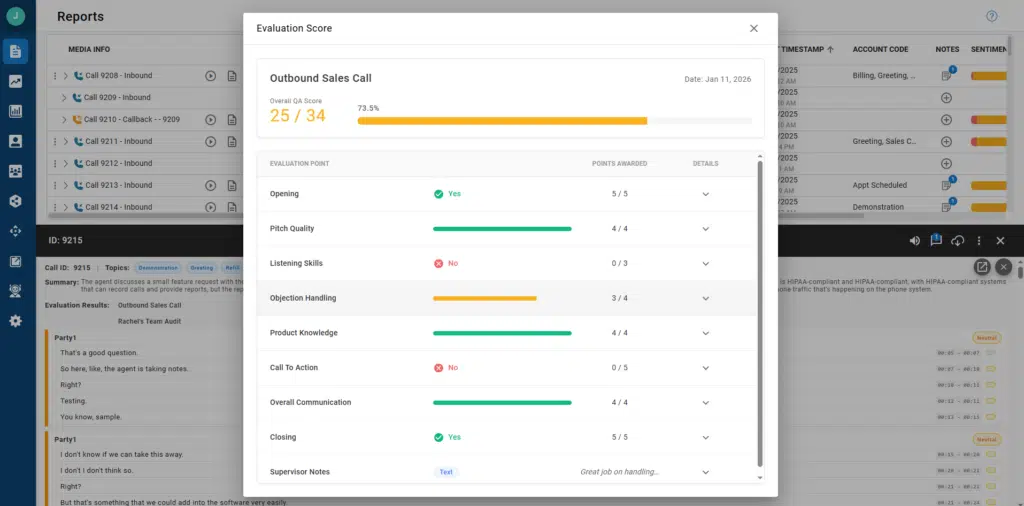
You build the evaluation, and AI does the scoring. Evaluations are completely customizable. You choose what questions matter for each queue or department, set the point values for each question, and decide whether you want yes/no answers or a 1–10 scale. John demonstrated two different evaluations live: one for a sales queue (checking for proper introductions, CRM discussion, pitch quality, and call-to-action) and one for a support queue (checking for ticket verification, follow-up, and first-call resolution).
Compliance requirements fit naturally into this structure. A financial services company, for example, can create a question like “Did the agent obtain two forms of customer verification, including account number and address?” and weight it heavily — so that missing this step has a proportionate impact on the overall score.
The AI explains its reasoning. For every scored question, the system provides a written explanation of why it scored the call that way. If you think it got something wrong, you can give it feedback — a thumbs up or down, and an alternative score. That feedback is fed back into the underlying language model, improving accuracy over time. John estimated that after about a month or two of feedback on the 3–5% of calls supervisors do review, the AI’s scores become highly consistent with how a human supervisor would score them.
Reporting is built in. Every evaluation question automatically becomes a reportable data point. Supervisors can track individual agent scores over time, break down performance question by question, add line or bar charts to reports, and filter by topic, sentiment, or evaluation score. Spotting that an agent was hitting their call-to-action in November but stopped in late December is the kind of trend that would be nearly impossible to catch with manual QA.
What This Looks Like in Practice
During the live demo, John walked through a real call that he’d staged earlier. A few highlights from what the system caught:
- He didn’t introduce himself at the start of the demo call. The Auto QA flagged it and explained: “The provided transcript begins mid-conversation. The agent never introduced themselves or the company.” That’s a legitimate ding on the evaluation — and the kind of thing a supervisor would only catch if they happened to pull that particular call.
- On a support ticket call, he correctly handled the ticket lookup, offered to send a password reset link via SMS, walked the customer through it, and confirmed resolution. The system tagged it with: Greeting, Support Call, Ticket Status, and First Call Resolution.
- He scored 67% on the support evaluation — not because of what he did wrong in the flow, but because he skipped the two-form verification step, which was worth 10 points and weighted accordingly.
Key Business Impacts
Across the webinar’s Q&A session, a few themes emerged about where this technology delivers the most value:
Eliminating bias in QA. The AI scores every call the same way. It doesn’t know or care which agent handled the call, what shift it was, or whether the supervisor tends to be lenient on Fridays. Random sampling with a human reviewer can skew toward either over-scrutiny or blind spots. Auto QA removes that variable.
Scalable compliance monitoring. If your business is audited and agents were supposed to be collecting specific information on every call, “we reviewed 5% of calls” is not a reassuring answer. Auto QA gives you documented evidence of what happened on every call.
Time back for supervisors. If a supervisor is reviewing 3 calls per agent per week across 10 agents, that’s potentially 3–4 hours a week spent listening to calls. Auto QA gives that time back — freeing supervisors to focus on coaching, strategy, and the other parts of their job that get crowded out by manual review.
First-call resolution, finally reportable. One of the most-requested metrics in contact centers has historically been nearly impossible to report on accurately without manual tagging. Topic detection and Auto QA can identify whether the customer’s issue was resolved on the first contact — consistently and at scale.
A Few Common Questions, Answered
Is it included in existing licenses? Speech analytics and Auto QA are included in Xima’s Elite license tier. They are not included in Essentials or Professional.
Does it support multiple languages? Yes — the system transcribes calls in whatever language they’re conducted in. It does not translate (e.g., Spanish to English), but if you need a quick translation, copying the transcript into Google Translate works fine.
Is the LLM private and secure? Yes. The underlying language model is private, secure, and firewalled from public AI systems.
Can it score AI bot conversations, not just human agent calls? Potentially, yes — as long as the recording is accessible to the platform. Some Xima partners have implemented this by registering AI bots as phones within the UC system, allowing recordings to flow through normally.
What about on-premise systems? Auto QA and Speech Analytics are not available for ACR or Chronicle on-premise deployments, but Xima’s cloud platform does work alongside on-premise IP Office systems.
Getting Started
If you’re currently relying on manual QA and finding that 3–5% coverage just isn’t giving you the insight you need — into agent performance, compliance risk, or customer experience — Auto QA is worth a serious look. The setup is designed to be straightforward: build your topic library, define your evaluations, and start collecting data. The system improves as you give it feedback, and within a couple months, most customers find it’s scoring calls the same way they would.
To learn more or see a live demo, reach out to the Xima team directly.


