
Key Takeaways
- A migration decision framework should weigh vendor capability, integration complexity, compliance requirements, and reporting continuity as separate, explicit criteria, not one bundled “is it time to move” question.
- CapEx vs. OpEx is not just a budgeting detail; for SMBs on fixed capital cycles, it often determines timing more than technical readiness does.
- Risk mitigation works best as a checklist applied before commitment, not a post-decision cleanup step.
- Change management should be evaluated as a decision input alongside cost and risk, since teams that underweight it are the ones most likely to stall mid-migration.
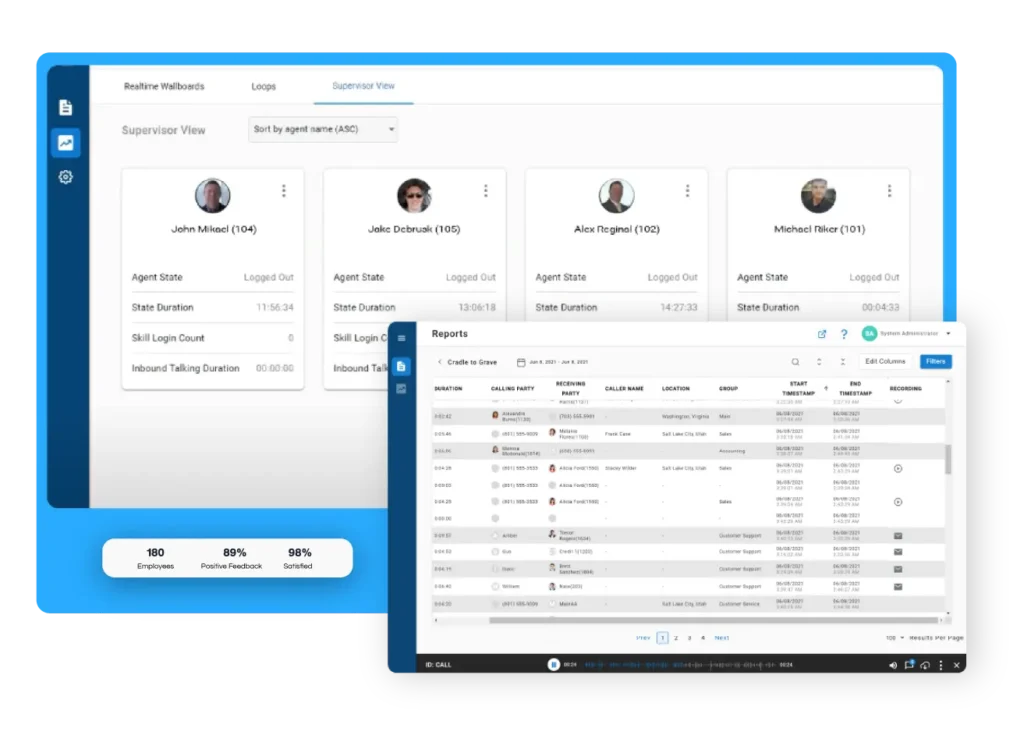
- Real-time analytics and reporting continuity across the transition should be treated as a selection criterion for the CCaaS vendor, not an afterthought once the platform is chosen.
That is why a framework works better than a checklist. Checklists are good for tasks. Migration decisions need something more structured. You need to compare vendor capability, integration complexity, reporting continuity, risk exposure, and change readiness as separate questions. If you combine all of that into one vague decision, it becomes easy to miss the issues that matter most.
This is especially true for teams already on Cisco, Mitel, or Avaya. Many of them are not starting from zero. They already have workflows, reporting habits, and compliance requirements tied to their current environment. A framework gives them a way to compare options without losing sight of what would actually need to change.
It also helps organize the research. Most buyers looking into migration have already read multiple guides and vendor pages, and each one explains a different piece of the picture. A decision framework pulls those pieces together so you can make a choice that is defensible, not just convenient.
Why migration decisions need a framework, not a checklist
Many cloud contact center migrations lose momentum before implementation ever begins. The problem is not usually a lack of technology options. It is trying to answer too many questions at once. Teams often approach migration as a simple decision to move or stay, when the better approach is evaluating each factor independently.
Breaking the decision into clear categories such as platform capabilities, cost structure, operational risk, and organizational readiness creates a stronger foundation for planning. It also makes it easier to explain the recommendation to leadership, compare vendors objectively, and identify potential obstacles before they become expensive problems.
This approach is especially valuable for organizations replacing established Cisco, Mitel, or Avaya environments. Existing reporting workflows, integrations, compliance requirements, and operational processes all deserve individual consideration rather than being rolled into one broad discussion about moving to the cloud.
Most organizations researching cloud migration have already read multiple articles, vendor pages, and implementation guides. The challenge is rarely finding information. It is making sense of it. A structured framework brings those pieces together in one place, helping decision makers weigh the factors that matter most before committing budget or selecting a platform.
Migration decision criteria: what to weigh before you commit
Before you commit to a cloud contact center migration, score the decision criteria that will shape the outcome. The goal is not to build a perfect spreadsheet. The goal is to understand where your current setup is limiting you and where a new platform would actually improve the operation.
Decision criterion | What to evaluate |
Reporting and analytics depth | Real-time dashboards, cradle-to-grave interaction history, and AI-scored QA coverage |
Integration compatibility | Existing CRM and help desk tools such as Salesforce, Zendesk, and Microsoft Dynamics 365 |
Compliance coverage | GDPR, PCI-DSS, HIPAA, and the audit trail requirements tied to your industry |
Vendor SLA terms | Uptime guarantees, support response times, and any data residency commitments |
Change readiness | Training, supervisor buy-in, and how much adoption support the team will need |
Reporting and analytics depth should be near the top of the list. If your team cannot see what is happening in real time, it becomes much harder to manage service levels, coach agents, and validate whether the migration is improving anything. That is why reporting and analytics depth is not just a feature request. It is part of the decision itself.
Integration compatibility matters just as much. A cloud platform should work with the tools your team already uses, not force a total rebuild of your operating model. If your CRM, help desk, and reporting tools all need custom work just to keep the lights on, the migration can create more friction than it removes.
Compliance coverage needs to be explicit too. Teams in regulated industries cannot treat GDPR, PCI-DSS, or HIPAA as afterthoughts. If the platform cannot support the controls, audit trails, and recording requirements you need, then the migration is not ready.
Vendor SLA terms are another area where details matter. Uptime is important, but so are response times, support expectations, and where your data lives. These are the things that shape trust after go-live, not just during the sales process.
The last criterion is often overlooked, but it can make or break the project. Change readiness is not only about training agents on a new interface. It is about whether supervisors have the time, support, and communication plan they need to bring the team with them. Even a strong technical migration can struggle if the people side is not ready.
For teams that want to keep their reporting strong before, during, and after a move, reporting and analytics should be treated as a selection criterion, not something to think about later.
CapEx vs. OpEx: comparing cost models for cloud migration
For many organizations, the migration decision is driven as much by financial planning as it is by technology. Operations teams may recognize the need for more flexibility, while IT may be focused on replacing aging infrastructure. Finance, however, often looks at the conversation through a different lens. They want to understand how the investment fits into existing budgets and what the long-term cost structure will look like.
An on-premise contact center typically requires capital investments in servers, telephony hardware, licensing, and periodic upgrades. A cloud contact center shifts much of that spending into predictable operating expenses through subscription-based pricing. Neither model is automatically better. The right choice depends on your organization’s budgeting process, growth plans, and technology strategy.
Understanding how these models differ helps stakeholders evaluate more than upfront costs. It also clarifies how future upgrades, maintenance, scalability, and total cost of ownership fit into the decision.
CapEx: the on-prem cost model
Traditional on-premise contact centers are built around capital expenditures. Organizations purchase servers, telephony hardware, software licenses, and supporting infrastructure upfront, then maintain those systems over a planned lifecycle.
While this approach gives organizations direct control over their environment, it also creates predictable refresh cycles. Hardware eventually reaches the end of its useful life, software requires upgrades, and vendor support agreements become recurring costs. As those investments accumulate, many organizations begin evaluating whether another round of capital spending makes sense or whether it is time to consider a cloud-based alternative.
Capital projects also tend to follow longer budgeting and approval cycles. Decisions are often tied to depreciation schedules, planned infrastructure refreshes, and annual capital budgets rather than immediate operational needs. For many organizations, those timing considerations become the catalyst for evaluating cloud migration in the first place.
OpEx: the cloud subscription model
Cloud contact centers move much of that investment into operating expenses through subscription pricing. Rather than planning around hardware refresh cycles, organizations typically pay recurring fees based on users, capabilities, or usage.
For many small and mid-sized businesses, this changes more than the accounting treatment. It changes how projects move through the approval process.
Instead of waiting for the next capital budget cycle, cloud investments are often evaluated alongside other operational expenses. That can make it easier to align technology decisions with business priorities, especially for organizations that need to scale quickly or support changing workforce requirements.
Cloud subscription models simplify expansion as staffing levels change or new communication channels are added.
Organizations can often adjust services without making another large capital investment.
That flexibility does not eliminate the need to evaluate total cost of ownership. Subscription fees, implementation services, integrations, and ongoing support should all be considered as part of the long-term financial picture. Looking beyond the initial price provides a more accurate comparison between cloud and on-premise environments.
Cost model | Typical structure | Primary decision makers |
CapEx (On-Premise) | Upfront hardware purchases, perpetual licensing, maintenance agreements, and scheduled infrastructure refreshes | IT leadership and finance teams working within capital budget cycles |
OpEx (Cloud) | Recurring subscription costs with usage-based scalability and ongoing platform updates | Operations, finance, and business leaders managing operating budgets |
Risk mitigation: a framework for reducing migration risk before you start
Migration risks are real, but most are manageable when they’re identified early. The biggest mistakes rarely happen during deployment. They occur weeks or months before the first user logs in to the new platform because planning gaps go unnoticed.
Rather than asking how to fix problems after they appear, organizations should evaluate the risks that can be addressed before making a final commitment.
Network and Bandwidth Readiness
Cloud contact centers depend on stable network performance. Voice quality, reliability, and user experience all rely on sufficient bandwidth and properly configured network infrastructure.
Before establishing a migration timeline, complete a network assessment that evaluates bandwidth capacity, latency, quality of service settings, and any potential bottlenecks. Addressing these issues early reduces the likelihood of call quality problems during and after deployment.
Integration and Number Porting Validation
Most contact centers rely on more than a phone system. CRM platforms, workforce management tools, ticketing systems, and business applications all need to work together after migration.
Testing these integrations in a staging environment allows teams to verify workflows before customers ever experience the new platform. Number porting should also be planned well in advance, as delays can affect business continuity if discovered too late.
Data Migration and Reporting Validation
Historical reporting data often receives less attention than live call routing, but losing access to historical trends can create immediate challenges for supervisors and operations managers.
Validate that customer records, historical reports, call recordings, and configuration settings transfer successfully before go-live. Maintaining reporting continuity allows supervisors to compare performance before and after migration without creating gaps in historical analysis.
Organizations that rely heavily on performance management should also verify that dashboards, scorecards, and reporting workflows continue supporting operational decisions throughout the transition.
Rollback Planning
Every migration plan should include a documented fallback strategy.
While the objective is a successful cutover, organizations should define the conditions that would trigger a rollback and establish the steps necessary to restore previous services if needed.
A rollback plan provides confidence during implementation because every stakeholder understands how critical services would be protected if unexpected issues arise.
A useful pre-migration checklist:
- Complete a network and QoS assessment before scheduling deployment.
- Validate CRM, help desk, workforce management, and communication platform integrations.
- Test phone number porting and routing in a controlled environment.
- Confirm historical reports, call recordings, and customer data migrate successfully.
- Document rollback procedures and assign responsibilities before launch.
Organizations that treat risk mitigation as part of the evaluation process instead of an implementation task are often better positioned to deliver smoother migrations with fewer operational surprises.
Change management as a decision factor
Many organizations focus heavily on platform features, implementation timelines, and technical requirements while giving far less attention to how the change will affect supervisors and agents. That imbalance often leads to slower adoption, inconsistent workflows, and frustration during the first few months after go-live.
Change management should be evaluated before selecting a platform, not after the contract has been signed.
For supervisors, the transition often means learning new dashboards, coaching workflows, reporting tools, and quality management processes. For agents, it means adapting to new interfaces, communication channels, and daily routines. Even improvements can create short-term disruption if users do not understand how the new system supports their work.
Successful migrations begin preparing employees well before deployment. Leadership should establish clear expectations, communicate why the migration is taking place, and identify champions who can help reinforce best practices across the organization.
Training should also extend beyond basic platform navigation. Supervisors need confidence interpreting new reports, responding to real-time alerts, and using analytics to coach more effectively. Agents should understand not only how to perform tasks, but also how the new environment helps them serve customers more efficiently.
Organizations moving from Cisco, Mitel, or Avaya platforms often discover that familiar workflows evolve alongside the technology. Planning for those operational changes early reduces uncertainty and helps teams become productive more quickly after launch. Teams that treat change management as a decision input, not a rollout task, see fewer stalled migrations.
Trends shaping migration decisions through 2026
Technology continues to evolve, but the biggest trends are influencing how organizations evaluate migration decisions rather than creating entirely new reasons to migrate.
As you compare platforms, consider how each one supports the capabilities that are becoming standard expectations for modern contact centers.
- AI-powered self-service and agent assist are changing reporting expectations. Supervisors increasingly need visibility into individual interactions instead of relying only on queue-level performance metrics. Solutions that support AI-powered root cause analysis can help identify emerging issues before they affect service levels.
- AI-generated fraud and voice impersonation continue to raise the importance of security, compliance, and interaction monitoring. Organizations are placing greater emphasis on platforms that support stronger audit trails, quality assurance, and reporting capabilities.
- Remote and hybrid work models have shifted infrastructure priorities. Cloud-first platforms make it easier to support distributed teams while maintaining consistent reporting, collaboration, and operational visibility across multiple locations.
These trends should strengthen your evaluation criteria rather than replace them. New capabilities are valuable only when they align with your operational goals, reporting requirements, and long-term technology strategy.
Common migration decision mistakes to avoid
Cloud migrations rarely struggle because organizations fail to recognize the value of modern technology. More often, projects lose momentum because critical decisions were overlooked early in the evaluation process.
Avoiding these common mistakes helps create a stronger business case while reducing unnecessary risk throughout the migration.
- Treating migration as an IT-only decision. Operations leaders, supervisors, and compliance stakeholders all have different priorities. Bringing them into the evaluation process early leads to more balanced decisions and fewer surprises during implementation.
- Skipping a structured comparison. Selecting a platform based primarily on sales demonstrations or feature lists makes it difficult to compare long-term operational value. Using a consistent decision framework helps ensure every solution is evaluated against the same business requirements.
- Underestimating change management. Technology adoption depends on people. Organizations that delay communication, training, and supervisor engagement often experience slower adoption and reduced confidence after deployment.
- Looking only at upfront costs. Comparing subscription pricing against hardware costs provides only part of the financial picture. Professional services, integrations, maintenance, reporting requirements, and long-term scalability all contribute to total cost of ownership.
Every migration involves tradeoffs. A structured evaluation process helps organizations recognize those tradeoffs before committing to a platform instead of discovering them after implementation has already begun.
Measuring success: what to validate after you decide
A successful migration is measured by operational outcomes, not simply by completing implementation.
Once the new platform is in production, compare performance against the baseline you established before migration. Looking at trends instead of isolated metrics provides a clearer picture of whether the migration is delivering meaningful improvements.
Supervisors should pay particular attention during the first 30 to 60 days as teams become familiar with new workflows and reporting tools.
KPI | What to compare before and after migration |
Average handle time | Establish a baseline before migration and monitor weekly trends after deployment to identify coaching or workflow opportunities. |
Abandonment rate | Track closely during the first several weeks to identify staffing or routing adjustments that may be needed. |
Compare resolution rates before and after migration to confirm agents maintain complete customer context across interactions. | |
Service level | Measure against your historical performance targets rather than relying solely on industry benchmarks. |
Customer satisfaction | Review trends alongside operational metrics to understand whether improvements are creating better customer experiences. |
These metrics become far more valuable when supervisors have continuous visibility before and after the migration. Historical reporting, real-time dashboards, and interaction-level analytics allow leaders to distinguish between temporary adjustment periods and meaningful operational improvements.
Migration should ultimately give decision-makers greater confidence in the health of their operation. Better reporting, stronger visibility, and more actionable insights allow supervisors to spend less time searching for answers and more time improving performance.
Conclusion: applying the framework to your own migration decision
The right migration decision looks different for every organization, but the evaluation process should not. Rather than asking whether cloud migration is the right choice in general, focus on whether it is the right choice for your organization today. Evaluate reporting capabilities, integration requirements, financial models, operational risk, and change readiness individually before combining them into a final decision.
This framework is designed to help operations managers, supervisors, and IT leaders build a business case they can defend with confidence. A thoughtful migration may take more planning, but it is far more likely to deliver lasting operational value than one driven by urgency alone.
Whether you’re modernizing an aging Cisco, Mitel, or Avaya environment or evaluating cloud contact center platforms for the first time, taking a structured approach will help you move forward with greater confidence and fewer surprises.

FAQs About Cloud Migration Decision Framework
The answer depends on your organization’s readiness rather than a specific timeline. Evaluate your reporting needs, infrastructure, integration requirements, compliance obligations, budget model, and change readiness together. If several of those areas indicate growing limitations, it may be time to begin planning your migration.
CapEx involves upfront investments in hardware, software, and infrastructure that are typically managed through capital budgets. OpEx shifts costs toward recurring subscriptions and operational spending. Many organizations find that cloud subscription models offer greater flexibility as staffing and business needs evolve.
Migration timelines vary depending on the size of the organization, the number of integrations, compliance requirements, and the complexity of existing infrastructure. Smaller deployments may move relatively quickly, while enterprise environments often require phased implementations that prioritize business continuity.
The most common risks include network readiness, integration compatibility, data migration accuracy, number porting, and user adoption. Planning for these areas before implementation significantly reduces the likelihood of operational disruption during deployment.
Built-in reporting often provides valuable operational visibility, but organizations with more advanced reporting requirements may benefit from deeper analytics, historical reporting continuity, customizable dashboards, and comprehensive interaction visibility. Evaluating your reporting needs before migration helps determine whether supplemental analytics capabilities will provide additional value.