The challenge is deciding where to start. Replacing an entire contact center system can be expensive, and most smaller teams cannot afford lengthy implementations or service disruptions. Fortunately, modernization does not have to happen all at once.
Improvements like skills-based routing, automated callbacks, and AI-powered quality assurance can address common operational problems without requiring a complete technology overhaul. By prioritizing these upgrades and measuring their impact over the first 90 days, contact center leaders can build a stronger case for future investments.
This guide covers three practical upgrades, a phased modernization roadmap, and the technology growing contact centers need to improve performance while keeping costs manageable.
Key Takeaways
- Contact center modernization can happen in stages. Small and mid-sized teams can improve their operations without replacing every system or committing to an enterprise-level budget.
- Three upgrades offer opportunities for early returns. Skills-based routing, queue callback, and automated quality assurance help reduce transfers, abandoned calls, and manual review work.
- Early savings can support future improvements. Reducing operational waste creates opportunities to reinvest in CRM integrations, automation, and analytics.
- Advanced AI works best with reliable data. Establishing effective routing, reporting, and connected customer records helps teams get more value from AI-powered tools.
- Smaller teams can modernize without dedicated IT departments. Cloud-based platforms and implementation support make advanced contact center capabilities more accessible.
Why Contact Center Digital Transformation Matters
Customer expectations have changed, but many small business contact centers still rely on phone systems designed primarily to answer and transfer calls. When customers need assistance with an order, billing question, or technical issue, they expect to reach someone who can help without repeating information or waiting through multiple transfers.
For teams managing growing call volumes, these expectations can be difficult to meet with disconnected systems.
Contact center digital transformation helps businesses improve the way calls are routed, customer information is accessed, and performance is monitored. A cloud-based Contact Center as a Service (CCaaS) platform can bring these capabilities together, giving agents and supervisors better visibility without adding unnecessary administrative work.
The ROI of modernizing a contact center often comes from addressing everyday inefficiencies. Fewer transfers, shorter queues, and more effective staffing decisions can reduce operating costs while improving the customer experience.
For businesses considering a move away from legacy infrastructure, a carefully planned cloud contact center migration can also reduce maintenance demands and provide greater flexibility as the team grows.
Common Challenges of Traditional Contact Centers
Older contact center systems can create problems that become more noticeable as call volumes increase. Supervisors may struggle to understand why service levels are slipping, while agents spend valuable time working around limitations in their software.
Some of the most common challenges include:
- High call abandonment rates: Long hold times frustrate customers and increase the likelihood that they will disconnect before reaching an agent.
- Unnecessary call transfers: Basic routing systems often send customers to the next available agent, even when another employee is better equipped to resolve the issue.
- Limited quality assurance coverage: Supervisors who manually review recordings can only evaluate a small portion of customer interactions, leaving potential service and compliance issues unnoticed.
- Disconnected customer data: Separate phone systems, customer relationship management (CRM) platforms, and helpdesk tools force agents to switch between applications and repeat information.
- Employee resistance to change: Agents and supervisors may be hesitant to adopt unfamiliar software, especially when new tools introduce additional reporting requirements or alter established workflows.
- Limited budgets and technical resources: Smaller businesses often lack the internal IT support needed to manage complicated migrations or maintain multiple software platforms.
- Security and compliance concerns: Introducing cloud technology and AI analytics requires careful consideration of recording permissions, customer data protection, and applicable regulations.
These issues carry costs beyond software maintenance. Missed calls can mean lost business, while inefficient workflows increase the amount of time employees spend handling each interaction.
The hidden costs of delaying contact center modernization can continue to grow as customer demand increases.
3 Practical Upgrades for Small and Mid-Sized Contact Centers
A successful modernization strategy starts with improvements that address existing problems and produce measurable results. For a contact center with 10 to 100 agents, three upgrades are particularly useful: skills-based routing, queue callback, and automated quality assurance.
These capabilities can improve performance within the first 90 days when implemented effectively, although the actual return depends on current call volumes, staffing costs, and software expenses.
Xima’s AI contact center software brings automation and interaction analytics into the same environment, helping smaller teams improve service without adding multiple disconnected tools.
1. Implement Skills-Based Routing
Traditional call distribution often sends an incoming call to whichever agent becomes available first. Although this approach keeps calls moving, it does not account for whether the agent has the knowledge needed to resolve the customer’s issue.
Skills-based routing uses predefined criteria to direct interactions to employees with the appropriate expertise. These criteria may include language proficiency, product knowledge, technical training, or experience handling specific customer requests.
For example, a software company’s support center might route account questions to billing specialists while directing technical troubleshooting calls to employees trained on the relevant product.
Getting the customer to the right person sooner can reduce unnecessary transfers, shorten hold times, and improve first-call resolution (FCR).
Supervisors can measure the impact by comparing transfer rates, average handle time (AHT), and first-call resolution before and after implementing new routing rules.
2. Add Queue Callback to Reduce Abandonment
Customers who call during busy periods may spend several minutes waiting for an available agent. Some disconnect before receiving assistance, while others call again later, adding more volume to an already busy queue.
Queue callback gives customers another option. Instead of remaining on hold, callers can request a return call while retaining their virtual position in line.
This allows customers to continue their day without waiting on the phone. It also helps contact centers manage unexpected increases in call volume without immediately adding staff.
For example, a financial services contact center experiencing a surge in billing inquiries can offer callbacks rather than keeping every caller on hold.
The result is a more manageable customer experience during busy periods, with opportunities to reduce abandonment and repeat dialing.
Managers should monitor callback completion rates, abandoned calls, and customer wait times to determine whether the feature is improving queue performance. Callbacks do not eliminate the underlying workload, so staffing still needs to reflect total demand.
3. Automate Quality Assurance
Manual quality assurance requires supervisors to listen to recorded calls, complete evaluation forms, and document areas where agents need improvement. For a team handling hundreds of daily interactions, reviewing every call manually is rarely practical.
Automated Quality Management (AQM) uses speech analytics and AI to evaluate customer interactions against predefined performance criteria.
Instead of selecting a handful of recordings, automated quality assurance can analyze 100% of supported interactions to identify missed disclosures, script deviations, customer frustration, and coaching opportunities.
This provides supervisors with a more complete understanding of agent performance while reducing the time spent searching through recordings.
For small business contact centers, automated QA also makes evaluations more consistent. Managers can identify recurring issues across multiple interactions rather than basing feedback on a single call.
The technology can help reduce compliance exposure by flagging potential issues for review, although human oversight remains important for confirming findings and determining appropriate action.
A Phased Budget-Conscious Roadmap for Mid-Sized Teams
Contact center modernization is easier to manage when each investment addresses a specific operational need. Rather than purchasing every available feature at once, growing teams can introduce capabilities in stages and use performance data to guide future spending.
This approach also helps businesses evaluate low-cost contact center software based on the features they will actually use.
A practical roadmap follows three phases, beginning with immediate improvements and gradually expanding into deeper integrations and automation.
Phase 1 – Stabilize and Automate for Rapid ROI
Suggested timeline: Days 1 to 90
The first phase focuses on establishing a reliable contact center foundation and fixing the problems that create the most daily friction.
Start by reviewing current call volumes, abandonment rates, transfer frequency, and the amount of time supervisors spend evaluating recordings. These figures provide a baseline for measuring improvements.
Next, introduce skills-based routing, queue callback, and automated quality assurance. If a cloud migration is necessary, coordinate implementation around the busiest queues and service requirements to limit disruption.
The goal is to produce measurable improvements within the first 90 days. Depending on the operation, this may include fewer abandoned calls, improved first-call resolution, and reduced manual QA hours.
Some teams may recover their initial investment during this period. Others will need more time, particularly when migration costs or existing contracts affect the budget.
Phase 2 – Deepen Core Integrations Through Self-Funding
Suggested timeline: Months 3 to 6
Once routing and quality management processes are performing reliably, the next priority is connecting customer information across systems.
Integrating the contact center with CRM and helpdesk software allows agents to access customer records during interactions. Features such as screen pops, automatic call logging, and shared interaction histories reduce the time spent searching for information or entering the same details in multiple applications.
These improvements can also support more personalized customer service because agents have better context before responding to an inquiry.
Businesses can use the operational savings measured during Phase 1 to help fund these integrations. However, the available budget should be based on actual savings rather than assumed returns.
Phase 3 – Add Time-Saving Automation and Analytics
Suggested timeline: Months 6 to 12
With routing rules established and customer data flowing between systems, contact centers can introduce more advanced automation.
AI-generated call summaries, automated transcription, and interaction tagging can reduce the administrative work agents complete after each conversation. Keyword detection and sentiment analysis can also help supervisors identify difficult interactions and emerging customer concerns.
These tools become more valuable when the underlying data is reliable. For example, an AI-generated summary is more useful when it can be associated with the correct customer record and interaction history.
Contact centers should introduce these capabilities based on their operational priorities and measure whether they reduce after-call work, improve coaching efficiency, or help maintain service levels.
Advanced automation does not need to be introduced across every queue simultaneously. Starting with a lower-volume or less complex queue gives teams time to adjust workflows before expanding to other areas.
Essential Technology for Modern Contact Centers
The right technology foundation allows contact centers to improve operations without introducing additional complexity. For smaller teams, that means choosing tools that share information, support existing workflows, and provide clear visibility into performance.
Unified Cloud Platforms
A cloud contact center brings customer communications and management tools into a centralized environment.
Instead of maintaining separate systems for voice calls, chat, email, and reporting, agents can manage interactions through a shared platform. Supervisors can monitor activity across locations, while IT teams spend less time maintaining physical telephony equipment.
Cloud-based CCaaS solutions also make it easier to accommodate remote employees and changing staffing needs. Businesses can expand their operations without purchasing additional on-site hardware for every new agent.
Seamless CRM Integrations
Customer information is most useful when agents can access it during an interaction.
Connecting contact center software to a CRM allows employees to view relevant account details, previous conversations, and open support requests without switching between multiple applications.
For example, when an existing customer calls about an unresolved billing issue, a connected system can display the associated account record before the agent begins troubleshooting.
Depending on the integration, automatic activity logging and screen pops can further reduce repetitive administrative work.
For small teams handling a high volume of repeat inquiries, these improvements help shorten interactions and create a more consistent customer experience.
Practical Analytics and Reporting
Modern contact centers need more than monthly performance summaries. Supervisors should be able to see what is happening throughout the day and respond before service levels deteriorate.
Real-time dashboards provide visibility into active queues, abandoned calls, wait times, and agent availability. Historical reporting helps managers identify recurring trends and determine whether operational changes are working.
For example, if incoming calls consistently increase during lunch hours, supervisors can adjust staffing schedules rather than allowing queues to grow.
AI-powered analytics can add another layer of insight by identifying patterns in customer conversations, agent performance, and recurring service issues.
These capabilities help managers make informed decisions without requiring a dedicated data analytics team.
Modernize Your Operations with Xima Software
Contact center modernization should make everyday work easier for agents, supervisors, and IT teams. Xima Software helps small and mid-sized businesses improve their operations with contact center technology designed to provide greater visibility and control without unnecessary complexity.
Xima combines practical tools for managing customer interactions with advanced reporting and AI-powered analytics.
With Xima, your team can:
- Connect customers to qualified agents: Skills-based routing directs incoming calls based on agent expertise, helping reduce transfers and improve resolution quality.
- Give callers more flexibility: Queue callback allows customers to request a return call instead of waiting on hold during busy periods.
- Automate quality monitoring: Auto QA evaluates interactions against your team’s criteria, identifying coaching opportunities and potential compliance concerns without requiring hours of manual review.
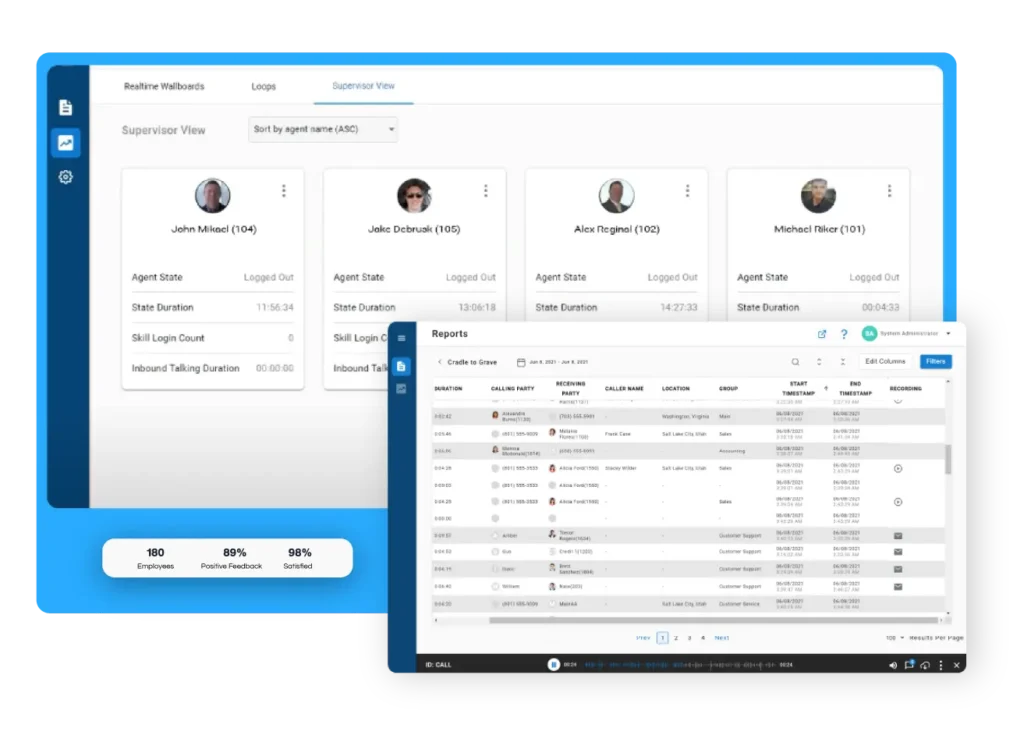
- Improve operational visibility: Real-time wallboards, cradle-to-grave reporting, and Xima Insights help supervisors understand performance trends and identify the causes of service issues.
Xima also provides white-glove implementation and support, helping businesses introduce new capabilities while keeping their existing operations running.
Whether your contact center is preparing to move away from legacy hardware or looking to improve its current workflows, Xima can help identify the upgrades that make sense for your team and budget.
Schedule a personalized demo to see how Xima can support your contact center modernization goals.
FAQs About Contact Center Digital Transformation
No. Many cloud contact center platforms are designed to reduce the technical work involved in implementation and ongoing maintenance. Xima provides white-glove implementation and support, making it easier for smaller businesses to modernize without maintaining a large internal IT department.
Implementation timelines depend on the size of the contact center, existing infrastructure, integrations, and migration requirements. Some upgrades can be introduced within weeks, while more complex deployments may take several months. A phased approach allows businesses to prioritize improvements while minimizing disruption.
Start by comparing operational metrics before and after implementing new technology. Important measurements include call abandonment rates, first-call resolution, average handle time, cost per contact, and time spent on manual quality assurance. Compare the financial value of these improvements against software, implementation, training, and ongoing operating costs to calculate return on investment.
Common challenges include limited budgets, disconnected customer data, outdated phone systems, employee resistance to change, and concerns about security or compliance. Smaller teams can address these challenges by prioritizing essential upgrades, preparing employees for new workflows, and choosing software that integrates with their existing business tools.
No. Contact centers can make meaningful improvements through better routing, callback options, cloud communications, and CRM integrations before introducing advanced AI. Once these systems are working reliably, AI-powered analytics and automation can help reduce manual tasks and provide deeper visibility into customer interactions.